My new favorite streaming accessory has nothing to do with streaming
My new favorite streaming accessory has nothing to do with streaming
If ever there were a time machine that let you stream more, this is it.


Robotic mowers — or automowers — have quietly gained traction in the past few years as more companies release new models. A friend of mine fittingly called my robot “a yard Roomba,” and yeah, that totally works. Just like robot vacuums changed how we clean inside, robotic lawn mowers take on the daunting task of one of the most time-consuming outdoor chores.
Though not discussed much (yet) in automower conversations, the Anthbot Genie 3000 is the latest contender in this space. It is marketed as a powerful, feature-rich mower that can handle everything from smaller, fenced-in lawns to larger, more complex yards like mine. But does it deliver on that promise? After testing it out for a few months, I can say that it absolutely exceeded my expectations.
Why are you reading this post on a website that is all about streaming? The simple answer is time. Using an automower has given me back hours every week that I used to trudge through my yard that I can now use in better ways, like binging the latest shows, while I watch my mower do all of the work in 90° temps that I used to have to do on my own. Not to mention it also keeps my backyard looking absolutely amazing for family movie nights. I don’t have to plan to spruce things up; my Genie 3000 takes care of the hard work for me.

Design & Build Quality
Right out of the box, the Genie 3000 feels premium. It has plenty of weight, but not enough that it keeps you from being able to easily pick it up when needed. At around 40 pounds, it’s not overly bulky, but it is sturdy enough to stay stable on slopes and uneven ground. The build is solid, with a weather-resistant plastic shell designed to withstand rain, sun, and the occasional bump into a tree trunk. It’s run into its fair share of rocks and retaining walls and is still going strong. The sleek, low-profile design helps it navigate under shrubs and around obstacles better than taller models.
In addition, setting up the mower is extremely straightforward. The large box contains the mower, charging base, RTK, mounting pole, and basic tools and wires. I was a bit scared at first, as this was my first dive into the world of robot lawnmowers, but thankfully, I wasn’t too overwhelmed by the amount of setup required to get up and running.
Features & Technology
The Genie 3000 packs in the kind of features you’d expect from a flagship robotic mower and then some:
- Cutting System: Adjustable cutting heights (1.2–3.5 inches) with a 10-inch cutting width
- Navigation: Uses a hybrid GPS (RTK) + sensor system for mapping
- Smart Controls: The companion app lets you schedule mowing sessions, check battery levels, and track mowing history
- Safety: Obstacle detection works well — the blades stop instantly if the mower is lifted or tilted. It slows when approaching objects and can detect pets and toys to avoid collisions.
- Theft Protection: Don’t worry about the mower “walking off”; it has built-in geo-fenced theft protection and a PIN lock.
Setup
Setting up the Genie 3000 was much smoother than expected. I was a bit suspect that a robot of this size could mow my entire yard, which is mostly made up of thick Zoysia grass. One thing that I had to do was pick a place for the mower’s base to live. It took me a while to find a spot that was both level enough and out of the way so the mower wasn’t just sitting outside my front door.
The Genie 3000 uses RTK (Real-Time Kinematic) for GPS positioning, which means no boundary wires are needed, but also means that you’ll need to mount the RTK tower on the included pole (or purchase the wall mount like I ended up doing) with a clear, unobstructed view of the sky. This was a bit challenging since, while Anthbot includes a 10-foot extension for the power cable, the RTK cable is much shorter and can really only be a few inches from the base station. You can purchase an extension cable for the RTK as well, but unfortunately, it’s not included in the box.
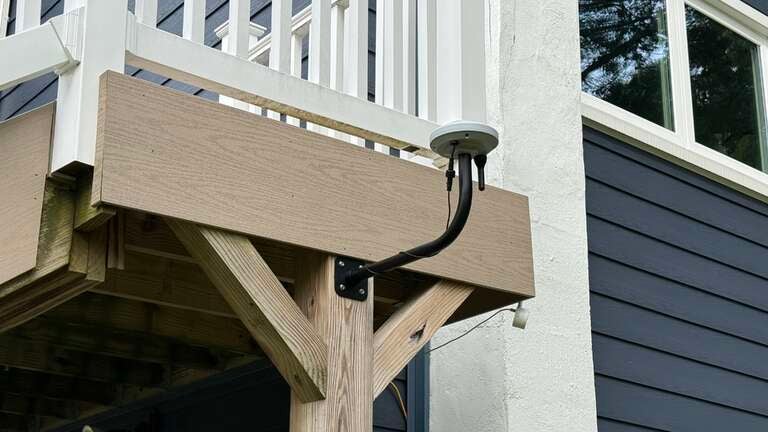
After finally landing in a good spot, it’s simply a matter of getting the charging station placed mostly level and putting the RTK pole in the ground so it won’t move. The whole system works off the RTK, so if it’s disturbed at all, it could mean remapping your entire yard. After a bit of waiting, once the RTK LED goes solid green, you know you’re in a good spot and ready to mow.
The Genie 3000 has a PIN lock that keeps things secure, and you’ll have to change it from the factory default before you get too far. You’ll need the PIN if you move the robot around, for example, which keeps anyone from walking off with it in hopes of using it. You can also set the geofence area in which an alarm will sound if someone tries to take off with your new prized possession.
Mapping
This is where the fun really starts. Like a kid with an overly expensive RC car, you connect to the Genie 3000 through Bluetooth on your phone. The app walks you through all the steps, but you mostly just drive the robot around the edges of your yard until you get back where you started, at which point a map of the area will be created. For me, this was the easiest way to map, as two edges of my yard border the open road. You can, however, opt to have the mower automap if you’ve got some sort of boundary — like a fence or wall — to keep it from going rogue.
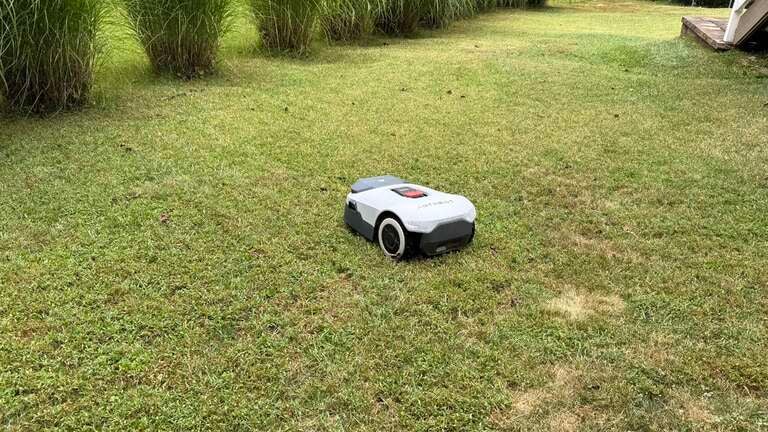
Mapping is also one of those things that you learn from as you go; I’d say I’ve mapped my yard about five times at this point. The first time, I was just eager to get going and didn’t care too much about being precise or watching my edges. A few mows in, I realized that I could go a bit further in some places or pull things back in others, so I remapped to clean things up. Unlike some other brands, where the only option is automapping and can take hours, mapping with the Genie took me about 20 minutes total, so it wasn’t really an issue to do it again — plus it’s fun!
Once your map is set, you should be mindful not to move the RTK at all, as that is the sole reference point for your entire map. Even moving it a few inches — which the app will nag you about — will cause you to have to remap and start fresh; again, that can be fun, but not simply because you moved the poll six inches.
Edges
When it comes to edge trimming, the Genie 3000 also has you covered. I have a mix of curb, sidewalk, and open area borders, and this is where the edge editing features really shine. With the app, you can choose edges where you want the Genie 3000 to go slightly over or cut lower, helping keep things clean after a mow. You don’t have to choose the same settings for the entire border, either. You can easily split up edges and change the settings for each — overlapping sidewalks for a clean cut in some places or making sure the mower doesn’t fall off the curb in others. You can run the edge mow individually or add it as part of the full mow, in which the Genie will perform the edge cut after completing the mowing session.
The edge cutting has been mostly successful for me, but at times, it hasn’t been fully completed or worked as intended. Thankfully, it’s still a work in progress, but it could be a bit better or more intuitive.
No-Go Zones
You’ll almost certainly need to create no-go zones for your mower. After initial mapping, you may have trees, ponds, or other off-limits areas inside the map that you’ll need your robo-mower to avoid. You can easily create no-go zones to keep the Genie 3000 from going anywhere near these obstacles.
You can choose from the box method — simply creating a box around the area you want — or the much, much easier remote method, in which you drive the Genie 3000 around the area you want to mark. The process is very straightforward through the app, whereby you take control of your robot (over Bluetooth) and drive it to the starting point, then navigate it around until you’re back where you started to create the zone to stay away from in the future.
I would love to see the ability to tweak these zones slightly by tapping and moving the edges, for example, but right now it’s either all or nothing. I had to change a no-go zone around a tree a few times, where the Genie 3000 kept getting stuck, and each time I had to do it by remotely driving the robot around the area. Not a huge deal, but something to keep in mind when mapping things out.
I’d also love it if the Genie 3000 were able to flag obstacles or create its own no-go zones automatically. I have two septic caps in my backyard that could easily be seen and marked as off limits, but after my Genie ran over one a few times, I had to mark it as a no-go zone. I thought dropping a small no-go box over it would work, but it’s not even noted on the map, so there’s really no way to pin down where exactly the zone needs to be without making it via the remote control. This was also a pain as the area is so small that it was really just the Genie spinning in a small circle to mark it out.
App
The Anthbot app is extremely robust and has all the settings and functions you’ll need to get mowing. Within the app, you can schedule, set up do not disturb, review mowing records, edit maps and edges, change voice settings, enable rain detection, and much more.

Click images to enlarge to full size.
One of my biggest gripes with the app (and probably the entire experience) has been how unreliable notifications are. Browsing through Reddit and Facebook threads, it’s a common issue with other users, but notifications never work properly for me (on iOS), meaning plenty of missed messages when there’s an issue like the mower being stuck, for example, which can really put a damper on the experience. I’ve made it a habit of checking the app often when mowing to make sure things are going smoothly, and while Anthbot has said they are working to fix the issue, they still fail to get notifications at all, ever. It’s by far the most frustrating part of lazy-mowing.

Click images to enlarge to full size.
Aside from the downers that are notifications, the app has plenty of goodness to balance it out. You can easily start full, zone, or edge mowing, set up schedules, change mower settings like height and direction, and even toggle rain detection, which returns the mower to the dock should the heavens begin to open up. There are plenty of options to keep your lawn the way you like it, as the Genie lets you choose the height and angle of the mow. You unfortunately can’t set this on a schedule (yet), however, which is a bummer, but I typically tweak my angle and start the mow manually instead. I’m told it’s coming soon, including an option to alternate angles on consecutive mows — a much-welcomed feature.
Performance
Performance is where the Genie 3000 earns its keep. On a larger size suburban lawn (close to three-quarters of an acre), it delivers a consistent and even cut, even through my dense, never-dethatched Zoyisa. The floating blade system adjusts well to slight bumps or dips in the yard, and while the first few runs did leave me with some missed lines, this definitely improved over time, especially when altering the cutting patterns.
Battery life is solid — I typically get close to three hours per charge — and the mower reliably returns to its dock before running out of juice. Recharging takes between 90 minutes and two hours, after which it’s automatically back out mowing. I have my yard split into three zones and have really dialed it in so the mower can complete each on a single charge most days.
The robot is also impressively quiet, quite the contrast to the noisy mowers of my youth. This may be obvious to some, but the value of this unobtrusive noise level really cannot be stressed enough. Running at around 58 dB, it’s a milder hum with a few occasional buzzes rather than that lawnmower roar we’re all used to. No ear protection or shouting needed, just quiet mowing, which means you can even let it run early in the morning or late in the evening without disturbing the neighbors.
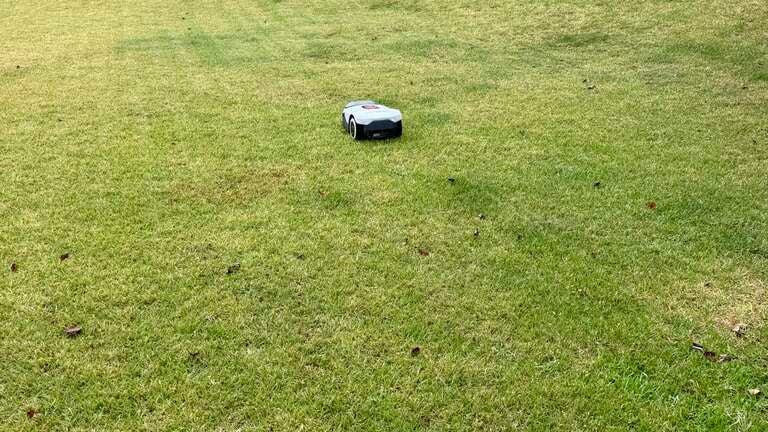
I was worried that the Genie 3000 would struggle with my taller, thicker grass or even on some of the inclines in my yard, but a few days in, and those worries were put to bed. While it does, at times, have some issues getting stuck in weird places, it’s never once struggled to get up a hill or mow where it needed to. Things like rocks and pine cones sometimes cause issues if they catch the wheel or the body the wrong way, forcing the mower to get stuck, but typically, I can fully mow without issue. I alternate mowing patterns between 45° and 135° each time I mow to get a lovely checkered pattern throughout my yard. This also helps pick up any spots the mower may have missed on the previous run. You can choose any angle you’d like, relative to the position of the base station and the cutting height, for individual zones or on a full mow.
When it comes to maintenance, there isn’t much to it. Blades are easily replaceable and readily available, and a simple rinse every few days keeps my Genie clean. I’ll flip it over once in a while, as another pain point of Zoyisa grass — and maybe other lawns as well — is that the dried, dead grass gets clogged up in the cutting wheel and around the wheels themselves. After a few pulls, it easily cleans out and is ready for the next mow.
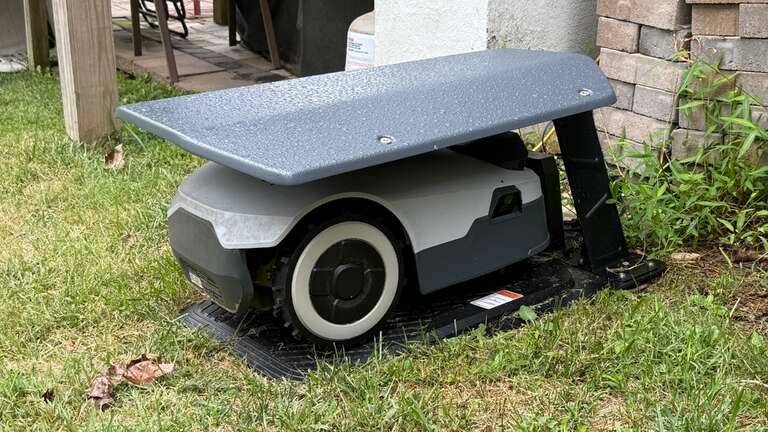
I also opted for the Anthbot garage to protect my mower somewhat. While it’s very overpriced, it still gives me peace of mind that my investment is protected from the harsher elements, even if it’s meant to be outside. Others have opted for cheaper methods like window coverings or even doghouses, and it seems like all of those options get the job done.
Ease of Use
Anthbot did a good job keeping things user-friendly. The app is intuitive for the most part, letting you set schedules, start mowing manually, or even remotely control the mower if needed. Setting up the GPS boundaries is quicker than laying wire, though things could be a bit finicky if your RTK placement is off. I had good success with the included RTK pole in the ground; however, I later opted for the RTK wall mount for a more permanent mounting location.
Maintenance is minimal — blades are easy to swap out, the underside is easy to hose down, and firmware updates happen automatically through Wi-Fi. The team at Anthbot is also very active in their Facebook community and constantly soliciting feedback and suggestions for new features, which is awesome. Even just the last few updates brought many welcome community-suggested features. I absolutely love that things just keep improving.
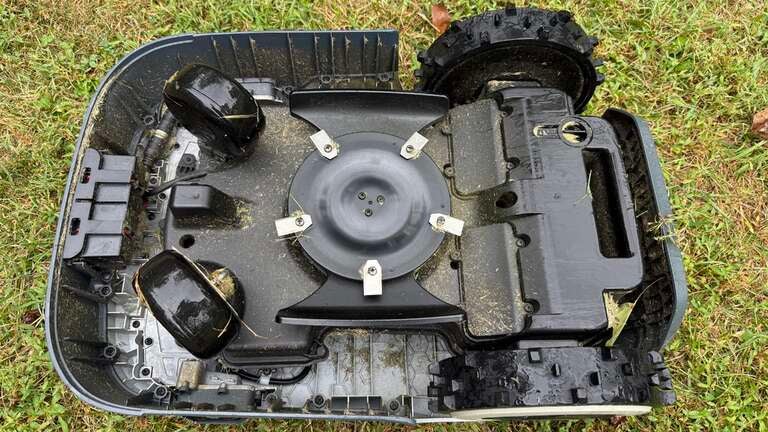
The Genie 3000 is really just a “set it and forget it” tool. You can start manual mowing as needed or by scheduling, then just let it do its thing. It doesn’t matter that it takes hours to mow what may take you 30 minutes or less, because you don’t need to be outside or even monitoring the mower. It does its job, goes back to the base, and is needed, and you’re free to do other things; it’s an insane time saver.
Pros & Cons
Pros:
- Smart GPS navigation for efficient mowing
- Long battery life with auto-docking
- Quiet operation
- Intuitive app
- Huge community and developer support
- Once you dial it in, it just works
Cons:
- Expensive compared to basic robotic mowers
- Notifications suck (for now)
- Initial setup can take some time to dial in
- No smart home support (but it’s supposedly coming soon)
- Some settings and things like scheduling could be better
- Notifications. So bad it’s on here twice.
What I don’t like
At this point, it may seem like I’m totally in love with the Genie 3000 — which I am — but it’s not without its flaws.
-
Notifications: I’ve said it multiple times now, but no notifications are absolutely killing me. The notifications do exist — if you leave the app open, you’ll see them pop up from time to time — but as far as regular background push notifications go, they’re nonexistent.
-
Scheduling: This could also be a bit more refined. Right now, you can choose a day of the week and time to mow, but you can’t specify every third day, for example. You also can’t change the mowing angle for a schedule, which keeps me just manually starting the mow on my chosen days.
-
RTK Quirks: While the RTK is magical and I cannot even imagine having to lay a boundary wire in my yard, it’s not without its quirks. If the wind blows the wrong way or the Wi-Fi or power goes out, the app will bug you that the RTK HAS MOVED and to PLEASE CONFIRM. It’s not that I don’t want to know if my RTK moved, but it seems like it’s a constant issue, and it always thinks it has changed position, even if it hasn’t moved. I solved the problem (mostly) but swapping the included RTK pole for a more stable wall mount, but it can still present itself to be an issue in many cases.
-
Editing: Editing the map or boundary is kind of a pain, but it’s also something that is being worked on. While a boundary edit feature was added, it’s still very finicky, and I haven’t been able to get it to work well. Editing is alson’t the most intuitive, as you need to tap in very specific places and be sure you don’t mess up in the process, or you’re forced to start fresh.
Overall, I absolutely love my Genie 3000, but given the current state of the app and firmware, there are still quite a few downsides you’re forced to work around. Thankfully, all of which are being actively worked on.
Who It’s For
You’ve made it this far — but is the Genie 3000 (or any automower) for you? If you spend tons of time mowing every week like it did, then absolutely. Yes, it’s a solid investment, but it’s also essentially the cost of a new mower. Once you’re up and running, it truly does everything you need, though you will still have to trim edges or areas the mower can’t reach. But even so, the time I spend doing that weekly now pales compared to what I used to do.
It’s less ideal for people with very small yards, those on a strict budget, or homeowners with yards full of steep slopes and obstacles. While each specific use case will be different, make sure you research based on your grass type, yard size, inclines, etc., to be sure the mower will work for your yard.
Final Verdict
The Anthbot Genie 3000 is a strong entry in the robotic mower market. It’s not often talked about with other big-name brands, but it certainly should be. It combines smart navigation, reliable performance, and user-friendly features in a package that feels worth the price for the right buyer. While it’s not perfect — you’ll still need to do some manual trimming and handle the occasional trouble spot — it dramatically reduces the time and effort required to keep your lawn looking sharp. And with improvements coming all the time, it feels like the developers are really listening to the customers’ needs.
Did I mention people will stare? I live on a busy corner, and I cannot tell you how many accidents my mower has almost caused because people stopped and gawked at it. It’s totally understandable, as it’s such a new, relatively unseen piece of tech, but it’s still amusing how many people stare.
If you’ve been waiting for a robotic mower that feels less like a gimmick and more like a real replacement for weekly mowing, the Anthbot Genie 3000 makes a convincing case. It not only takes the hard work of weekly mowing off your to-do list, but gives you hours back every week that you can use for better things — like streaming!