Does HBO Max allow you to turn off autoplay?
Does HBO Max allow you to turn off autoplay?
HBO Max comes with a huge library of content, but if you don’t need autoplay, does the service let you adjust your settings?

HBO Max might be one of the top services to use autoplay with. That’s because not only does it have a host of HBO originals and other premium content in its catalog, it also carries a large selection of shows from cable channels owned by Warner Bros. Discovery, including Discovery, Food Network, HGTV, and more.
Viewers who are a little bit befuddled by all that content might want autoplay turned on. But if you’re confident enough to explore the HBO Max catalog without autoplay, we’ll let you know whether or not you can disable the feature right here.
Everything you need to know about autoplay on HBO Max
Can you turn off autoplay on HBO Max?
Yes, you can! HBO Max lends to its reputation as a premium streaming service with its autoplay, but if you don’t need that feature as you look through its vast selection of TV shows and movies, it’s a simple matter of a few clicks to turn the setting off and not have to worry about it anymore.
How do you turn off autoplay on HBO Max?
You can change your full autoplay settings on the HBO Max app for smart TV, or you can choose to do so on the streamer’s website with your laptop or desktop. Either way, seek out your profile icon and click settings to get started with the process of turning off autoplay on HBO Max.
Once in the settings menu, click Playback Settings. On this screen, you can choose to turn off autoplay previews, disable the autoplay episodes, and adjust your autoplay recommended movies & series settings.
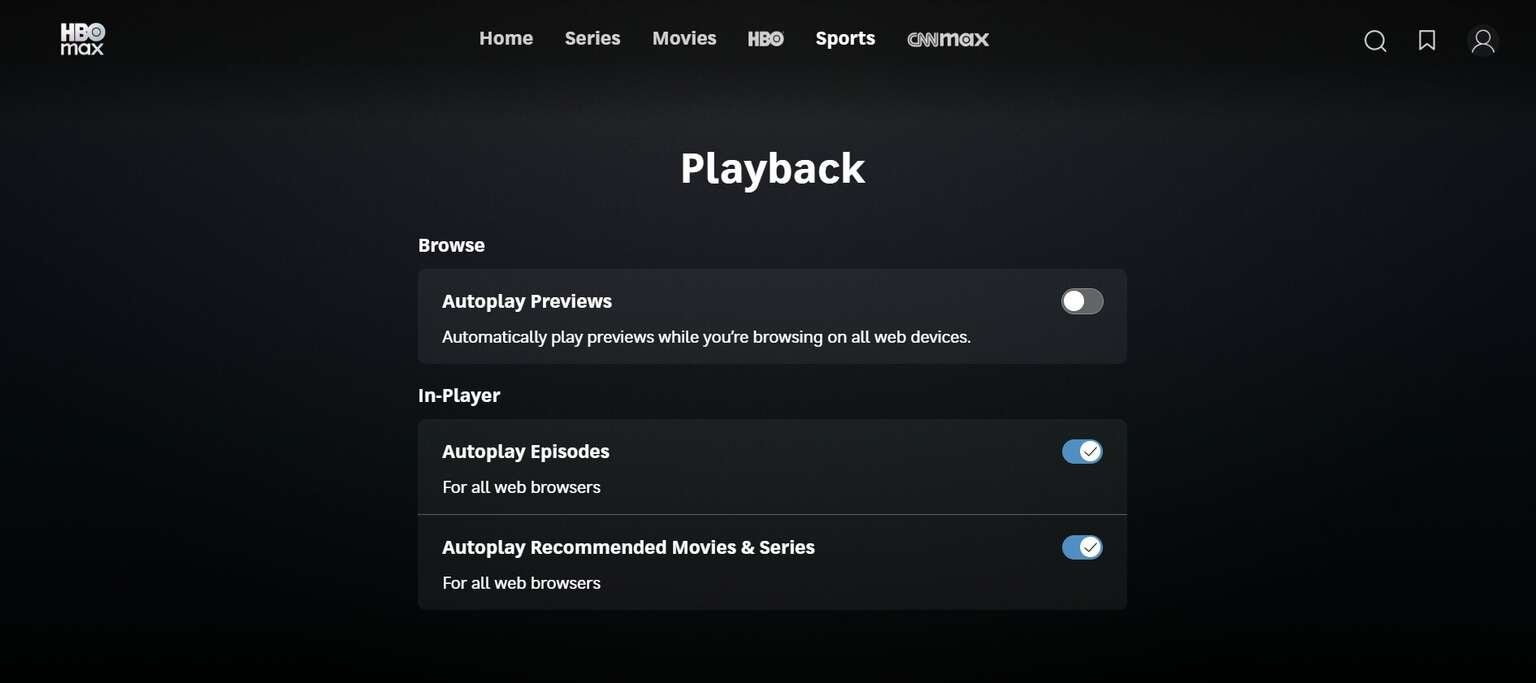
Autoplay adjustment options on HBO Max. Click to expand.
Will HBO Max disable autoplay on all devices?
Toggling the autoplay preview settings will turn off autoplay trailers in the HBO Max app on all devices. Switching off either of the in-player autoplay features will only affect that setting on web browsers, and the HBO Max mobile app only allows you to turn off autoplay for the next episode on that particular phone.
Can you turn autoplay back on with HBO Max?
Of course! If you want to restore autoplay on HBO Max, all you have to do is follow the instructions above to find the setting again, then adjust it to your liking. Turning off autoplay on HBO Max doesn’t mean it’s off forever.

HBO Max
HBO Max is a subscription video streaming service that gives access to the full HBO library and exclusive Max Originals. There are hubs for content from TLC, HGTV, Food Network, Discovery, TCM, Cartoon Network, Travel Channel, ID, and more. Watch hit series like “The Last of Us,” “House of the Dragon,” “Succession,” “Curb Your Enthusiasm,” and more. Within HBO Max, B/R Sports allows users to watch live NBA, MLB, NHL, March Madness, and NASCAR events.