How can you customize your Fubo channel guide?
How can you customize your Fubo channel guide?
Fubo offers a good mix of customization options with its channel guide, if you know how to use it!


There’s no beating Fubo when it comes to accessing live sports channels. Fubo carries a large selection of national and regional sports channels, and it’s one of the few live TV streaming services to carry a big selection of regional sports networks around the country.
There’s plenty of news and entertainment options with Fubo as well, and with all those options subscribers can be forgiven for wanting to simplify their channel guide to see only the networks that are most relevant to them. We’ll show you all the options for refining your Fubo channel guide below!
What are all the ways to customize your Fubo channel guide?
Can you favorite channels on Fubo?

Click to expand.
It’s easy to favorite channels in your Fubo channel guide. When you click over to the guide, you’ll notice a small star icon next to the channel logos. Click that star, and those channels will be added to your favorites list in an instant, making it much easier to find them when you come back to Fubo.
What other filters are available with Fubo’s channel guide?
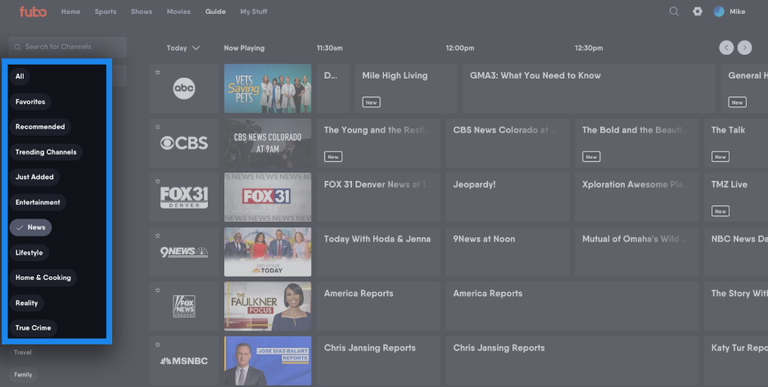
Click image to expand.
There are several other ways to filter your Fubo channel guide. You can easily slim down the guide to show just your favorites, or see Recommended, Trending Channels, Just Added, Entertainment, News, Lifestyle, Home & Cooking, Reality, Sports, True Crime, and more. You’ll see these filters along the left side of the screen.
Can you rearrange channels manually in the Fubo guide?
You can do so within the Favorites section. The Reorder Favorites button will allow you to drag your favorite channels up and down at will, putting them in the exact order you want to see them in. Once you do that, simply click save, and you’re good to go!
Can you hide channels on Fubo?
There is no specific way to hide channels per se, but once you’ve got your favorited channels sorted out, the ones you don’t select will be pushed to the bottom of the guide, where you never have to see them.
Can you search for channels on Fubo?
Yes, if there’s a specific channel you want to watch with your Fubo subscription, you can click the magnifying glass icon at the top of the screen to search for it and find it even more quickly.
How to sign up for Fubo
- Click here to sign up for Fubo.
- Choose the plan you want, then click Start free trial.
- Create a Fubo account with a username and password.
- Enter payment details and finish signing up.

Fubo
Fubo is a live TV streaming service offering a robust lineup of approximately 150 premier channels, with plans starting at $63.99 per month. This entry-level package provides access to local broadcast affiliates 18 of the leading 35 cable channels channels, and valuable regional sports networks (RSNs).