Get the lowdown on the HBO Max user interface
Get the lowdown on the HBO Max user interface
HBO Max delivers quality titles and a premium vibe, but does its user interface match up with that reputation?


It’s true that the name-changing habits of HBO Max have gotten to be a pretty tired joke these days. But underneath all the humor (and justifiable confusion) that comes with it lies a still-formidable streaming service with a highly diverse catalog of content.
The user experience on HBO Max is something that Warner Bros. Discovery CEO David Zaslav called “not particularly good” in 2022, before the streamer re-launched itself as simply “Max.” While the name has been changed back, the question remains whether or not the interface upgrades that Zaslav promised to bring to the service have improve the service or not?
Check out my review of the HBO Max interface here to find out. Please note: this is a review of the HBO Max interface on its app for Fire TV; your experience may differ slightly from mine, based on the device you use to stream.
Does HBO Max have a good user interface?
What is the HBO Max home screen like?
The HBO Max home screen doesn’t try to reinvent the wheel. At the top of the screen, viewers will see the main content carousel, which highlights select titles and shows video previews of those shows and movies automatically. Anyone who has read my past reviews knows this isn’t a particular favorite feature of mine, but I also realize opinions may differ on this subject.
The menu for HBO Max is found on the left side of the screen. When you pull it up, options on this menu include a profile switching option, as well as tabs for My Stuff, Search, Home, Series, Movies, HBO titles, What’s New, Sports (for ad-free subscribers), News, and a Categories page.
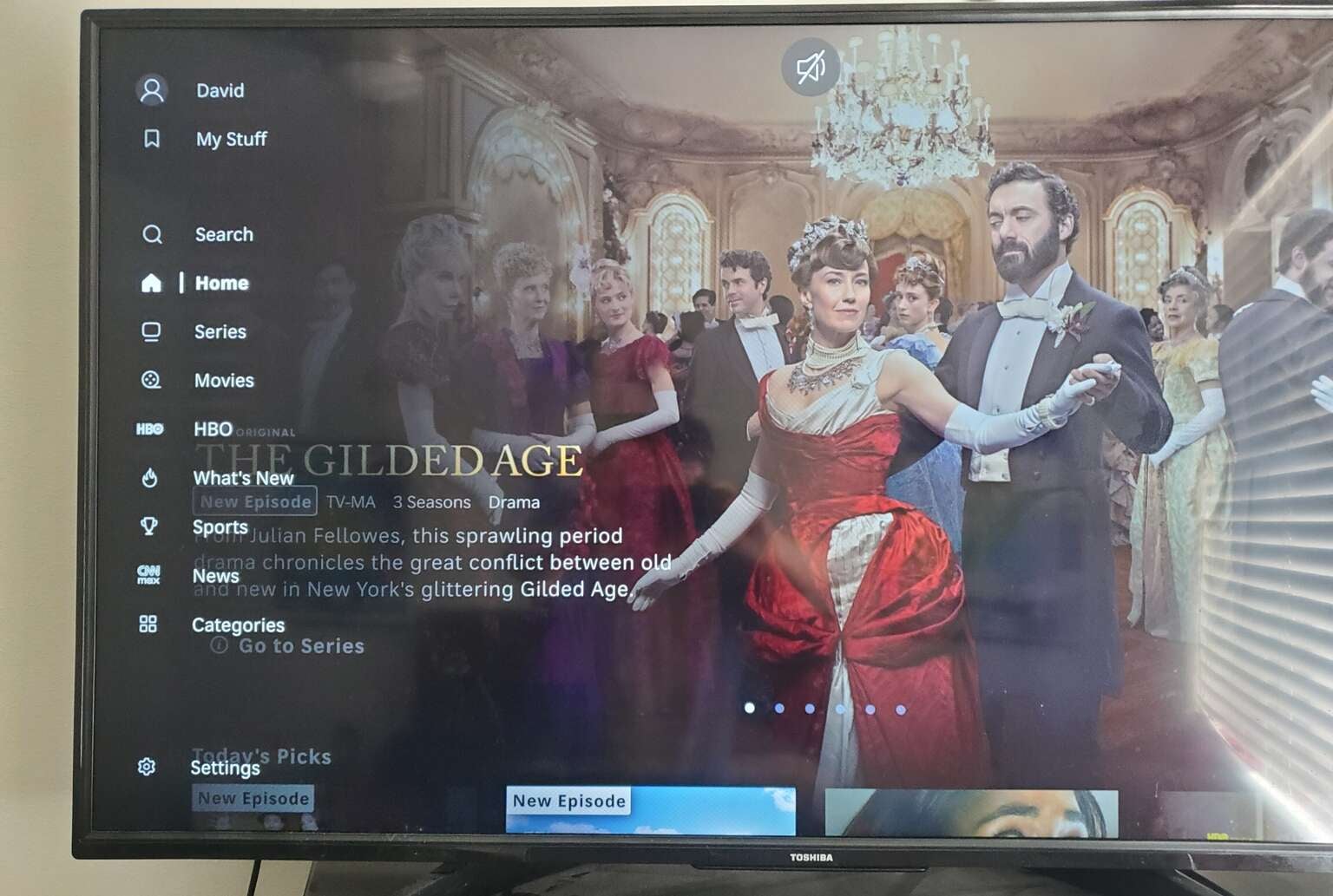
The HBO Max side menu is fairly standard as compared to other services. Click to expand.
I liked that HBO Max didn’t make me scroll as far down to find my Continue Watching row as other streamers do, making it much easier to get back to streaming the title I was watching last when I came to the service. I also appreciated that the Recommended For You row just above my Continue Watching actually holds titles relevant to my viewing history, instead of being an algorithmically-generated mess.
I wasn’t as impressed with the Today’s Picks row, which is above the Recommended For You carousel, however. I didn’t really feel like HBO Max had any rhyme or reason for offering me these particular titles other than they were shows and movies the streamer wants me to watch, and that didn’t really connect with me. I felt this content row could easily have been moved lower down in the streamer’s home page.
Home page score: 7 out of 10
Is content discovery easy on HBO Max?
Yes, HBO Max makes content discovery pretty painless in my opinion. I like the number of options the streamer places in its side menu, which allows viewers to jump to a content category instantly. Having an HBO menu option is especially convenient, as I suspect the vast majority of users who come to the streamer are here for these titles specifically. The search button is also very easy to find in the HBO Max interface.
I think there is one thing HBO Max could do better, however. When the streamer changed its name to Max in 2023, it incorporated a large amount of on-demand programming from WBD-owned linear channels like Food Network, HGTV, and Magnolia Network. I would like to see a tab in the menu dedicated to these titles specifically, as I think they’re a little too hard to find on the streamer otherwise.
Content discovery score: 9 out of 10
Is it easy to move between categories on HBO Max?
Yes, the left-hand menu layout of the streamer makes it easy to jump in and out of categories offered within the menu — though I will say, scrolling all the way over to that left-hand menu if I have been moving right with my cursor through tile rows can be a bit of a burden.
Category switching score: 9 out of 10
Does HBO Max make it easy to find live content?
I appreciate the HBO Max home page for putting live content from the news and sports categories in one combined tile row, found just below the Continue Watching section. That makes the home page less chaotic in my opinion, and viewers can still seek out the particular categories of news or sports in the left-side menu.
Some viewers might want more access to live content without having to seek out a dedicated menu tab, however, so I will mark HBO Max’s interface down slightly for not making live streaming content more available on its home page.
Live content availability score: 8 out of 10
How are HBO Max’s playback controls?
The HBO Max playback controls feel simple and user-friendly at the same time. There is a button to change subtitles and audio dub options, an option to bring up other episodes of the given title you’re watching, and a recommendations section — and that’s it. Otherwise, it’s just the playback bar.
I liked the fact that bringing up the Episodes option shows all the episodes from a given season of a show, instead of pulling up the seasons first. If you want to go back or forward considerably from the episode you’re currently watching, however, it’s easy to do; simply press down from the Episodes carousel, and you can browse through other seasons easily. Most importantly, the interface hides this information until you ask for it, which keeps the screen from feeling cluttered.

HBO Max’s playback controls are clean and efficient. Click to expand.
Clicking on a title in the Continue Watching row on HBO Max will play that title immediately, but if you click on a show or movie you haven’t watched yet, you’ll be taken to that video’s details page instead. That allows viewers to learn a little bit more about a program before simply being thrust into the thick of things.
Fast-forwarding and rewinding allow viewers to speed up to four times the regular playback speed, which is efficient enough. HBO Max also allows users to skip ahead or back by 10 seconds.
Playback controls score: 9.5 out of 10
How easy is it to skip credits and intros on HBO Max?
The skip intro and skip to the next section buttons on HBO Max appear automatically, so you won’t have to dig around for them too much. They also don’t disappear if you wait too long, which I enjoyed. HBO Max will also display a small timer that shows how long you have before it will play the next episode automatically for you when the end credits begin to play.
Ease of skipping intros and credits score: 10 out of 10
Conclusion
All in all, I think the HBO Max user interface lives up to the premium reputation the streamer has tried to cultivate. It’s not perfect, but it does a good job of guiding viewers to the content they want to see without a lot of superfluous steps, which is pretty much all I can reasonably ask for in a streaming UX.
Overall score: 8.75 out of 10

HBO Max
HBO Max is a subscription video streaming service that gives access to the full HBO library and exclusive Max Originals. There are hubs for content from TLC, HGTV, Food Network, Discovery, TCM, Cartoon Network, Travel Channel, ID, and more. Watch hit series like “The Last of Us,” “House of the Dragon,” “Succession,” “Curb Your Enthusiasm,” and more. Within HBO Max, B/R Sports allows users to watch live NBA, MLB, NHL, March Madness, and NASCAR events.