How easy is it to customize your channel guide on Philo?
How easy is it to customize your channel guide on Philo?
Philo doesn’t offer a lot of customization options, but you do have some choices!


Philo is one of the most intriguing live TV streaming products available. While it doesn’t come with as wide selection of channels as some other streamers, it still includes a good mix of cable entertainment networks, and at a starting cost of $28 per month it’s a great way to dip your toe in the pay-TV world without having to commit hundreds of dollars per month.
As with most live TV services, Philo comes with an electronic programming guide to allow viewers to browse what’s on TV and when. But does Philo have any customization options? Our experts dug into that question so you don’t have to!
What customization options are available with Philo’s programming guide?
Does Philo let you favorite channels?
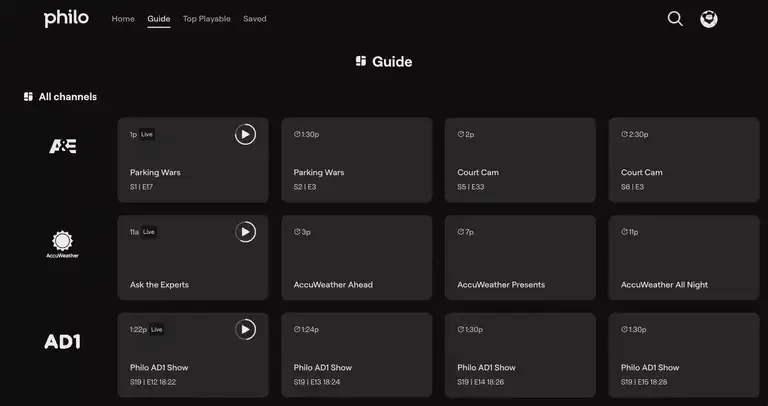
Yes, you can favorite channels in the Philo guide to make them appear at the top of the grid. Simply press and hold on a channel logo, or find the heart icon underneath that logo to favorite a channel and mark it as one of your favorite options.
Favorited channels will be displayed in alphabetical order and will move automatically to the top of your guide. That will make them available with just a few clicks of the remote.
Can you filter channels on Philo in any other way?
No, unfortunately, Philo does not offer any other way to filter channels. It’s one drawback of the service; many other streamers come with the option to filter out certain channel categories, such as news or movie channels. There’s also no way to sort your Philo channels by number, or any other option.
In this case, the Philo guide is something of a lesson in getting what you pay for. Philo is a very inexpensive way to get some highly in-demand cable channels, but its programming guide leaves something to be desired in regard to customization options.
Can you manually re-order channels on Philo?
No, there is no way to re-order channels by moving them up or down manually in Philo’s channel guide.
Can you search for channels with Philo?
Yes, you can use the search bar at the top of the screen in your Philo interface to search for channels by name. If you have a specific channel in mind and don’t want to scroll through the Philo guide to find it, this is a much quicker way to access it.
How to sign up for Philo
- Click here to sign up for a seven-day free trial of Philo.
- Create your account with a username and password.
- Choose any optional add-ons you want with your Philo subscription.
- Enter payment information and finish signing up.

Philo
Philo is a live TV streaming service designed for entertainment lovers, offering flexible ways to watch without the high price of traditional TV bundles. The service now features two paid plans — Essential and Bundle+ — alongside its existing free streaming offering, giving customers a range of options depending on how much live and premium content they want.