Need to download a show or movie on Hulu? Here’s how
Need to download a show or movie on Hulu? Here’s how
Hulu allows users of select plans to download many of its titles for offline viewing.


The Hulu library truly does pack in something for everyone, from adult animated favorites like “Family Guy” on Fox to originals like “Only Murders in the Building,” and just about everything in between. It’s common that when people think of their favorite show or movie, they know to find it on Hulu.
That makes it especially convenient that Hulu allows you to download TV shows and movies on your mobile devices for offline viewing. But if you have questions about how to download with Hulu, which devices are supported, or other queries, we will help you walk through the process below!
Everything you need to know about using downloads on Hulu
Which plans can you use to download titles on Hulu?
Hulu Premium subscribers can download TV shows and movies on Hulu, but customers of the Hulu with ads plan cannot. Viewers can also use downloads with Hulu on all of the ad-free versions of the Disney Bundle.
What devices can you use to download shows and movies on Hulu?
Hulu supports downloads on the following downloads:
- iPhones and iPads
- Android mobile devices
- Amazon Fire Tablets
How many downloads does Hulu allow you to have?
Hulu will let you download as many as 25 TV episodes or movies on up to five supported devices at once. If you exceed these limits, Hulu will send you a pop-up telling you to delete some downloads if you want to keep adding more.
Do downloads expire on Hulu?
Yes, you have 30 days to watch any downloaded episodes or movies on your Hulu account — unless the title you have downloaded expires on Hulu and is pulled from the streamer before that time. Once you start playback of a downloaded title on Hulu, you have 48 hours to finish watching before it expires.
How to download TV shows and movies on Hulu
- Connect to a Wi-Fi network, or enable cellular data downloading.
- Go to a TV show or movie’s detail page and locate the download button.
- Click the download button — on TV shows, it’s next to the episode on a details page, and on a movie, it’s under the play button.
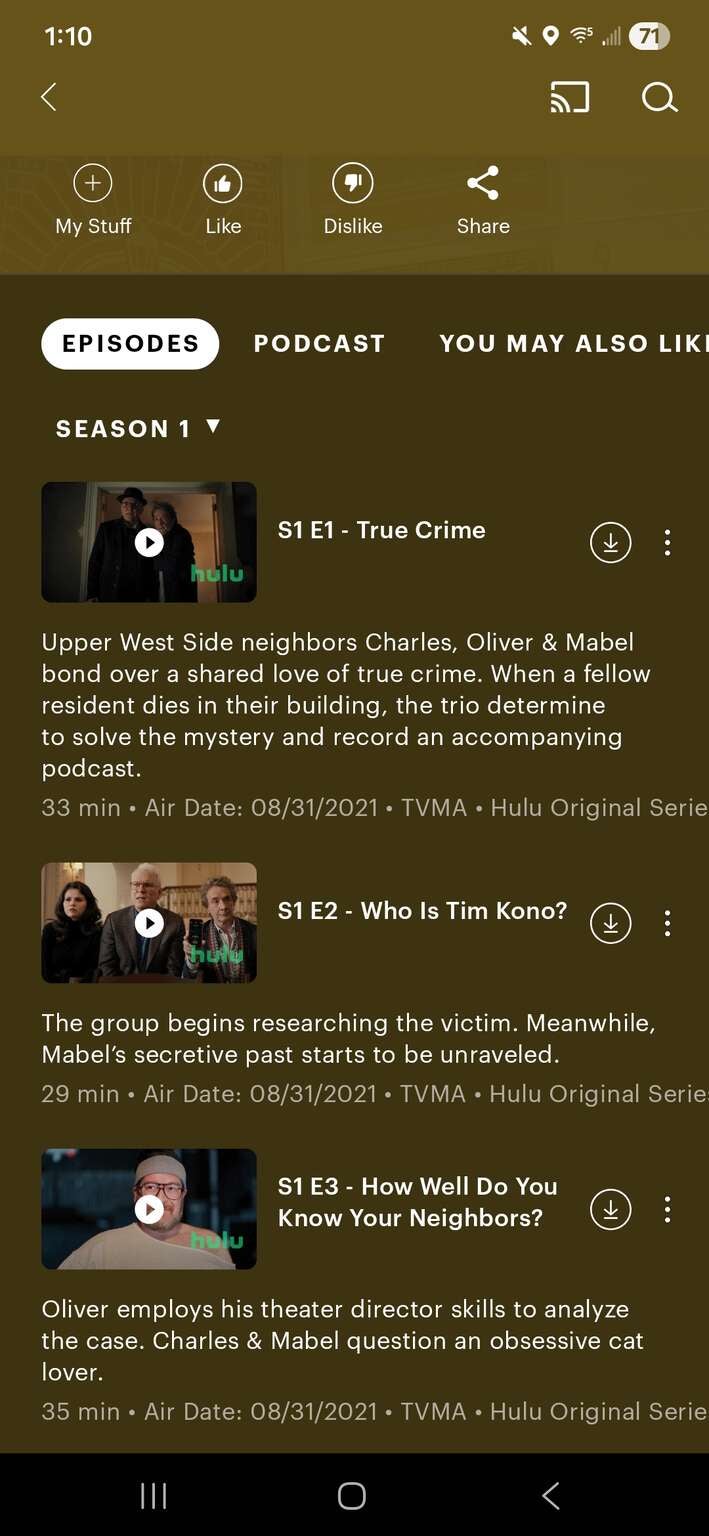

Hulu keeps the download button for TV shows and movies in different places in its app. Click to expand.
How to watch and delete downloaded shows on Hulu
To watch your downloads on Hulu, find the Downloads section along the bottom row of the screen in its mobile app. See all the titles you have downloaded, and watch whichever you choose!
Once you’re ready to delete a show or movie from your downloads, return to this screen and select the titles you wish to remove at your leisure.

Hulu
Hulu is a video streaming service that gives access to thousands of full seasons of exclusive series, hit movies, kids shows, and Hulu Originals like “Only Murders in the Building,” and “The Handmaid’s Tale.”