Our guide for pulling titles from Continue Watching on Disney+
Our guide for pulling titles from Continue Watching on Disney+
Disney+ makes taking shows and movies out of its Continue Watching row very easy.


The Disney+ user interface strives to be as user-friendly as possible, and it’s a good thing considering how much content the streamer has. Alongside its classic titles, Disney offers shows and movies from the Marvel and Star Wars universes, live sports from ESPN, and even Hulu’s greatest hits for subscribers to both services.
But if you get caught up in a show or movie you don’t intend to finish on Disney+, will that show tile simply languish in your Continue Watching row? We’ll let you know how to remove a show or movie from Continue Watching on Disney+ below!
Everything you need to know about removing titles from Continue Watching on Disney+
How to remove a show or movie from Disney+ Continue Watching row on TV app
If you’re using a connected TV device to watch Disney+ on the big screen, it’s pretty easy to remove a show or movie from your Continue Watching row. Simply boot up your device, open the Disney+ app, navigate to the title you want to pull from Continue Watching, and long-press the select button on your remote to see the remove option come up.
You can also remove a show or movie from your Continue Watching section from that title’s Details page. You’ll see the remove icon on the right side of the page when you open Details; click that, and you’ll be set to go.
How to remove a show or movie from Disney+ Continue Watching row on web browser
Head to the Disney+ website and log in to your account. Hover the cursor over the title you want to pull out of the Continue Watching section, and you’ll see a small circle with a horizontal line through it in the top right corner of the tile. Click this icon to remove the series or film from the row.
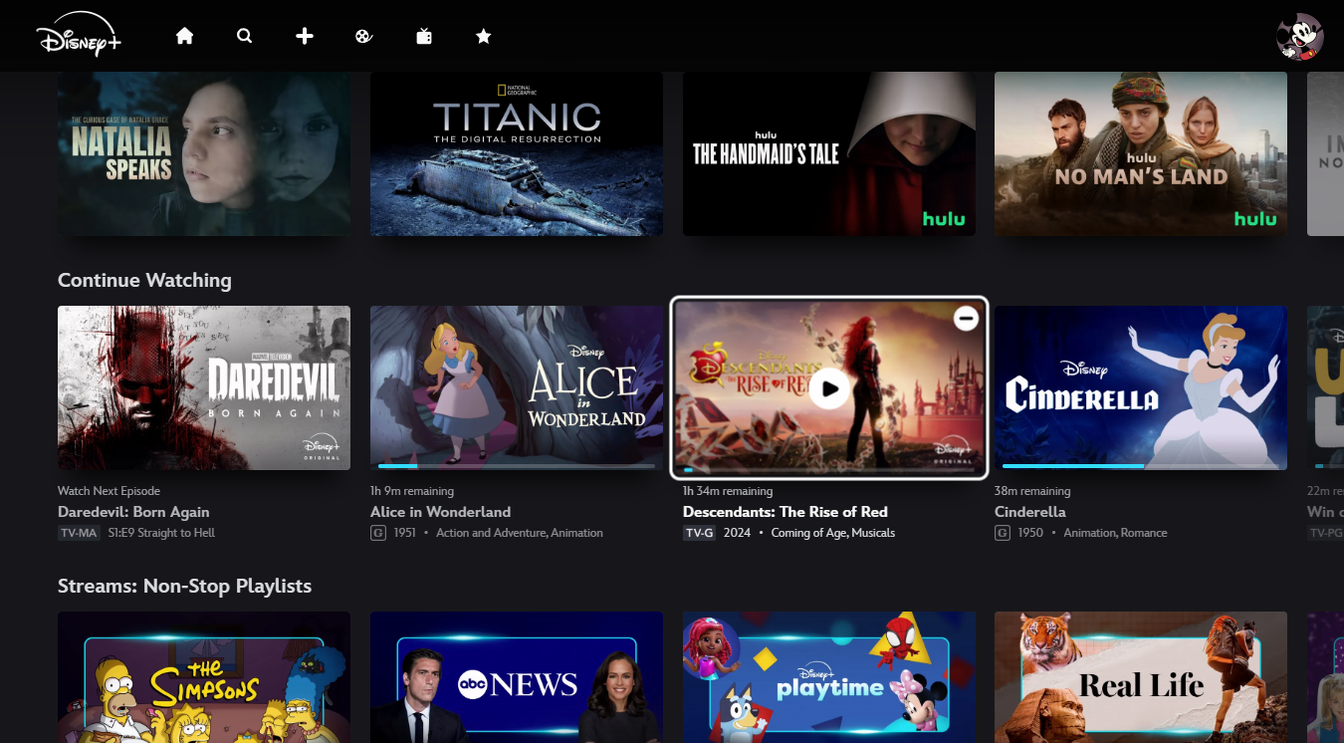
Click image to expand.
How to remove a show or movie from Disney+ Continue Watching row on mobile
Open the Disney+ app on your mobile device, then scroll to the Continue Watching row. You’ll see a three-dot icon on all tiles within the row; click this, and select Remove. Then, when a pop-up prompt appears, select Remove again.
Can you restore removed titles to Disney+ Continue Watching row?
Disney+ will not give you an option to restore your titles to the Continue Watching row when you remove them. However, you can simply start watching that title again to put the show back in the row.
Can you hide a show you haven’t started watching from Disney+ home page?
The Disney+ home page might be packed with titles you don’t want younger family members to see on a shared account. There’s no way to hide these titles from the home page, but you can use parental controls to make sure kids don’t see objectionable content on the Disney+ app.

Disney+
Disney+ is a video streaming service with over 13,000 series and films from Disney, Pixar, Marvel, Star Wars, National Geographic, The Muppets, and more. It is available in 61 countries and 21 languages. It is notable for its popular original series like “The Mandalorian,” “Ms. Marvel,” “Loki,” “Obi-Wan Kenobi,” and “Andor.”