Here’s how to pull titles from Continue Watching on Frndly TV
Here’s how to pull titles from Continue Watching on Frndly TV
Frndly TV’s process for removing shows and movies from Continue Watching is a very simple one.


Frndly TV lives up to its name in multiple ways. Not only is the service packed with family-friendly content, including cable channels like History Channel, Hallmark Channel, and Lifetime, but it also starts at a price of just $7 per month. There’s another way that Frndly TV embodies its moniker: by making it easy to remove a TV show or movie from your Continue Watching section. We’ll let you know the easiest way to do that with step-by-step instructions below!
What you need to know about removing TV shows and movies from Continue Watching on Frndly TV
Where is Continue Watching on Frndly TV?
Frndly TV puts its Continue Watching row in a bit of a different spot than other streaming services do. Instead of housing the row on its home page, Frndly keeps it in the My Stuff tab as part of its DVR feature, which is available to both Classic ($8 per month) and Premium ($10 per month) subscribers.
How to delete shows and movies from Continue Watching on Frndly TV
Open up Frndly TV using the mobile app, the smart TV app, or on a web browser. You’ll see the My Stuff tab at the top of the screen, at the end of the row including Home, Guide, Movies, and TV.
Once you’re in My Stuff, scroll down to the Continue Watching row. When you see the title you want to delete, click on it and you’ll be taken to that title’s details page.
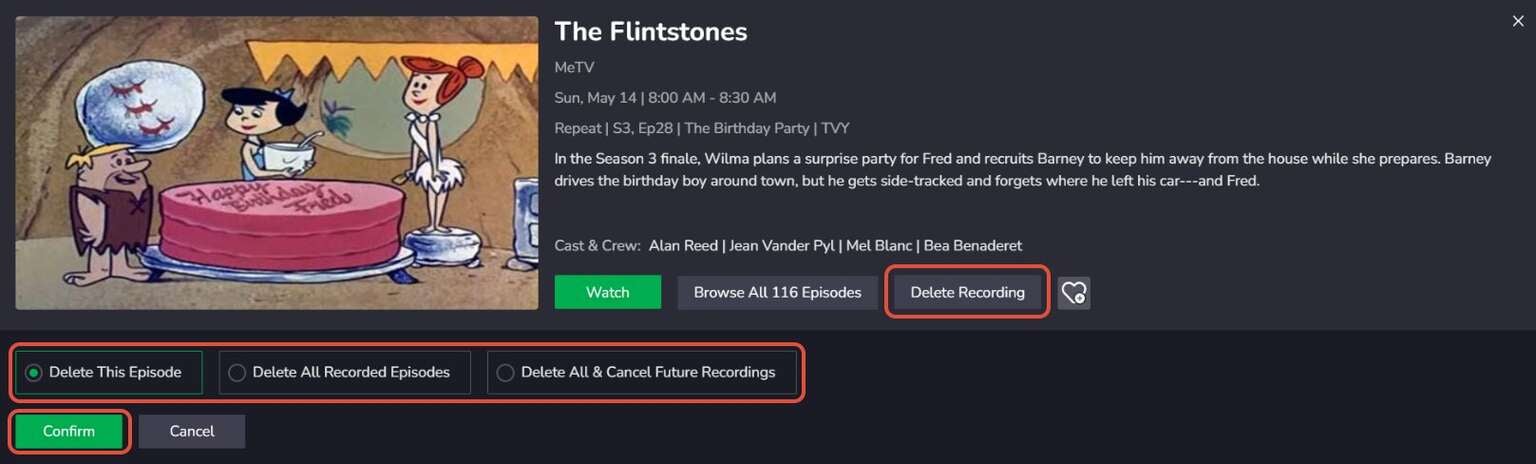
Click to expand to full size.
You can choose to delete a single episode, delete all recorded episodes of a show, or delete and cancel all future recordings, so Frndly will no longer DVR the title in question and put it in your My Stuff section.
Can you hide content you haven’t watched on Frndly TV?
Unfortunately, there doesn’t seem to be a way to remove shows and movies from the Frndly TV home screen if you have no interest in watching them. But watching more content on Frndly will help the service learn more about your viewing habits, so you will see more relevant recommendations going forward.

Frndly TV
Frndly TV is a budget-friendly live TV streaming service in the United States that focuses on family-friendly and lifestyle programming. Launched in 2019, the service offers a curated lineup of channels that includes Hallmark Channel, UPtv, Lifetime, MeTV, INSP, The Weather Channel, Game Show Network, and dozens more. It’s designed for viewers who want wholesome content without the’ high cost or complexity of larger streaming bundles.