Here’s how to set The Streamable as your preferred search source in Google
Here’s how to set The Streamable as your preferred search source in Google


Since you’re reading this, you’re clearly a fan of The Streamable. But you don’t always have to visit our site to find the latest streaming news and updates. Did you know you can set The Streamable as a preferred news source in Google? When you do, our stories will appear more prominently in the Top News section whenever you search for streaming-related topics. That means you’ll see our coverage right alongside the latest headlines — no need to hunt for it.
It only takes a few clicks, and it’s the easiest way to ensure you never miss breaking news, updates on your favorite services, or guides to the best ways to watch.
How to set your preferred Google search source
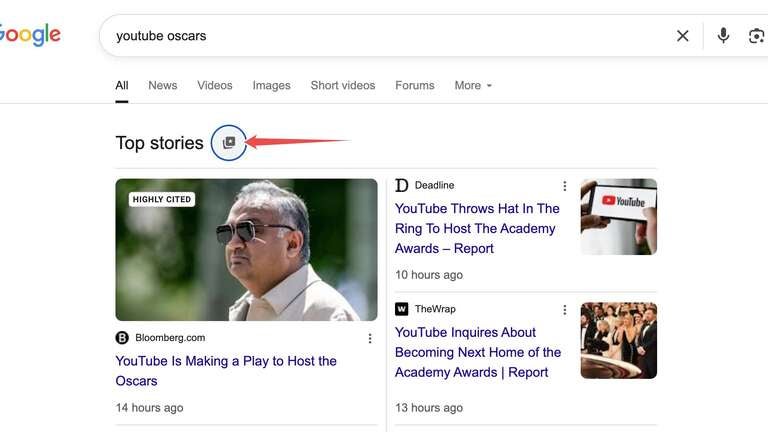
Search for a topic that’s currently related to streaming news (or even just “streaming news”), then click on the icon next to Top Stories
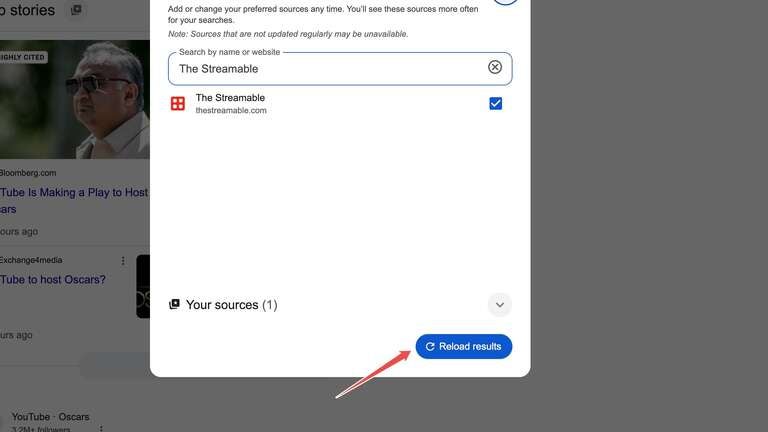
Search for and select The Streamable, then choose Refresh Results
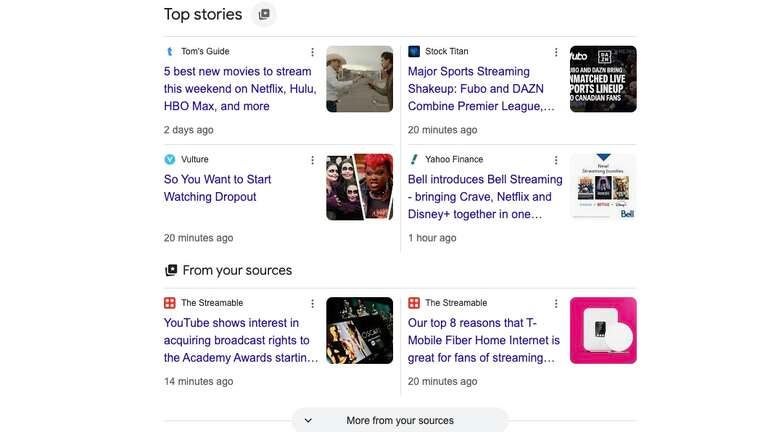
See your preferred sources in Top Stories
Search away!
Now, when you check your Top Stories, you’ll see The Streamable featured as a preferred source under the “From your sources” section. From now on, whenever you search for streaming news, reviews, or updates, content from The Streamable will appear more prominently — making it easier than ever to stay informed. No more digging through pages of results; you’ll have the latest headlines, insights, and guides right at your fingertips, whenever you need them.