How to use the Watchlist feature on Disney+
How to use the Watchlist feature on Disney+
Watchlist is a highly convenient way to save shows and movies to watch later on Disney+, and we’ll show you how to use it here!


The Disney+ library is already huge, and it’s only going to get bigger in the near future. The streamer will fully integrate all titles from Hulu in 2026, and when that happens the streamer’s catalog will be even bigger and more dizzying to wade through than it is now.
Fortunately, Disney+ also offers viewers a feature it calls Watchlist, which lets customers earmark TV shows and movies to save and watch whenever they want to. But if you need a little help using Watchlist for the first time, The Streamable’s experts are here to guide you through the process!
What you need to know about Watchlist on Disney+
How to save titles to your Disney+ Watchlist
Thankfully, Disney+ makes using its Watchlist feature a more-or-less unified experience across devices, which makes for an easier customer experience. Whether using Disney+ on the web, with the streamer’s connected TV app, or with a mobile device, you’ll want to navigate to the details page of the title you want to save on your Watchlist as your first step.
Next, seek out the Watchlist button. On any Disney+ platform, this will take the form of a + sign, and for titles that are already added to the list, a checkmark will appear where the + button would be.
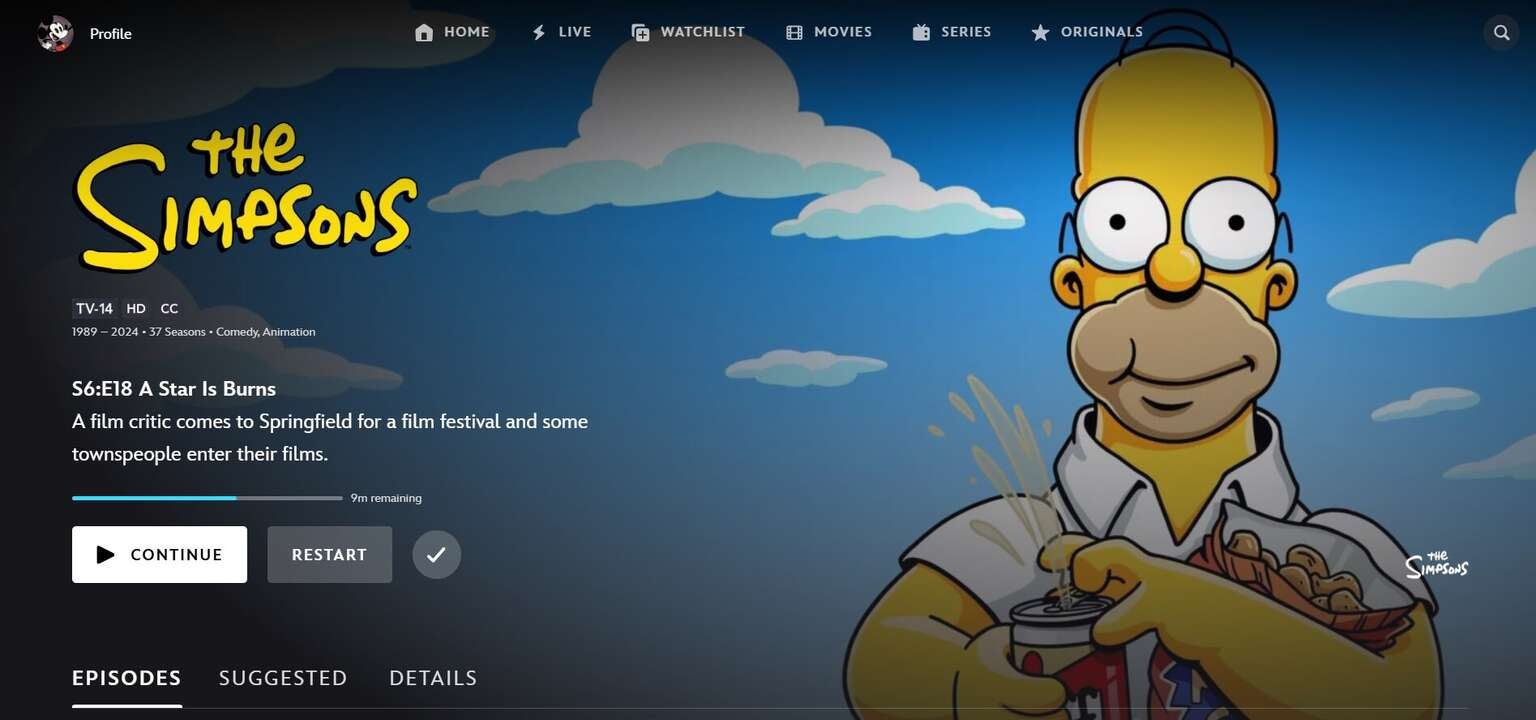
Disney+ makes its Watchlist button easy to find on all devices. Click to expand.
Simply click the button to save that title to your Watchlist, and you’ll be able to find it there any time you have the time to come back and actually give it a stream.
How to watch titles saved in your Watchlist on Disney+
Once you have a show or movie saved to your Watchlist on Disney+, all you have to do is click into the Watchlist section in the side menu or top or bottom navigation bars, and browse until you find the specific title you want. Click it, and start streaming immediately — though it’s important to note, you will have to be connected to the internet to do so.
How to delete shows and movies from your Watchlist
- Open the Disney+ app or the streamer’s website.
- Go into the Watchlist section.
- Select the checkmark icon on the title’s detail page to remove it from your list.

Disney+
Disney+ is a video streaming service with over 13,000 series and films from Disney, Pixar, Marvel, Star Wars, National Geographic, The Muppets, and more. It is available in 61 countries and 21 languages. It is notable for its popular original series like “The Mandalorian,” “Ms. Marvel,” “Loki,” “Obi-Wan Kenobi,” and “Andor.”