How to use Hulu’s My Stuff feature
How to use Hulu’s My Stuff feature
We’ll show you how to take full advantage of the My Stuff tab on Hulu with ease.


When the phrase “general entertainment” is brought out, it usually means that a streamer has a huge selection of content to browse through. That certainly applies to Hulu, which combines its own library of originals with next-day streams of primetime shows from Fox and ABC, movies, and more.
If that amount of content has you worried that you might forget about a TV show or movie you want to watch with Hulu, you should make sure to check out the service’s My Stuff feature. My Stuff allows you to set aside TV shows and movies from Hulu onto a personal watchlist to stream whenever you want, and we’ll describe how to use it below.
How to use My Stuff on Hulu
How to save TV shows and movies to My Stuff on Hulu
If you want to save a TV show or movie to My Stuff on Hulu, all you have to do is search for that title or find it within the streamer’s numerous content tile carousels on its home page. Once you find it, click the title’s art to bring up its details page, where you’ll find the add to watchlist button.
It doesn’t matter if you’re using the Hulu mobile or connected TV app, or the service’s website; you will always be looking for the same thing: a small + button between the Watch Party button and the three-dot menu. Click the + button to add the TV show or movie in question to My List.

How to watch shows and movies in My Stuff on Hulu
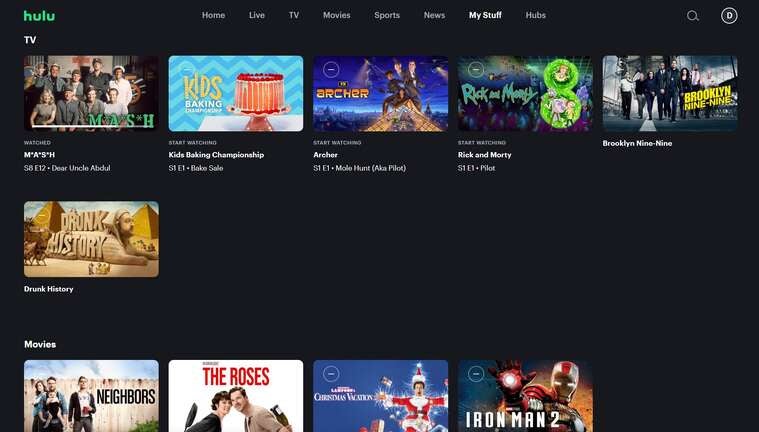
The My Stuff tab on Hulu is located in different places in the streamer’s interface, depending on where you’re trying to watch the streamer. On the streamer’s website, it’s at the top of the screen, and in its connected TV app, it’s in the left-hand menu near the bottom of the list of options. On the Hulu mobile app, it’s at the bottom of the screen.
Once you locate the title you want to watch, just click on it and start watching!
How to delete titles from My Stuff on Hulu
There are two ways to delete a show or movie from My Stuff on Hulu. First, you can open the My Stuff tab on Hulu’s website and press the small minus button that shows up in the tile art of your saved TV shows and movies. Alternatively, you can navigate to the details page of the show or movie you have saved, find the checkmark button where the + button used to be, and press it to take that title off the list.

Hulu
Hulu is a video streaming service that gives access to thousands of full seasons of exclusive series, hit movies, kids shows, and Hulu Originals like “Only Murders in the Building,” and “The Handmaid’s Tale.”