Disney+ goes where you go! Watch, download, and keep the magic rolling on every trip
Disney+ goes where you go! Watch, download, and keep the magic rolling on every trip
From hotel rooms to flights, Disney+ keeps the magic close wherever you roam


Streaming favorite movies and shows while traveling is easier than ever with Disney+. The platform offers tools that keep entertainment close at hand in hotel rooms, on planes, or during long train rides. Offline downloads let you store movies and episodes directly on your phone or tablet, eliminating the need for a constant internet connection. Household settings and account management keep streaming smoothly across multiple devices, helping avoid those frustrating “not part of your Household” messages.
A little preparation transforms long flights, layovers, and road trips into prime time for Disney, Pixar, Marvel, and Star Wars marathons. Disney+ makes traveling with entertainment straightforward, reliable, and ready whenever you are.
How to stream on Disney+ while away from home:
Does Disney+ work outside your home?

The short answer: Yes. Disney+ can travel with you. You can watch it on supported devices in most countries where the service is available. If you are away from home, bring your mobile device or sign in with your Disney+ login on the TV or streaming stick wherever you’re staying.
There is one catch: Disney+ tracks your household based on your home WiFi network and location. Use it outside that location, and the app might prompt you to confirm that you’re away. All you need to do is hit the “I’m Away From Home” button and enter a one-time passcode sent to your email.
This keeps your account safe and makes sure the service knows it’s really you. Keep in mind, this feature can only be used a limited number of times per month. Extended stays may require updating your household location.
Household options for long trips
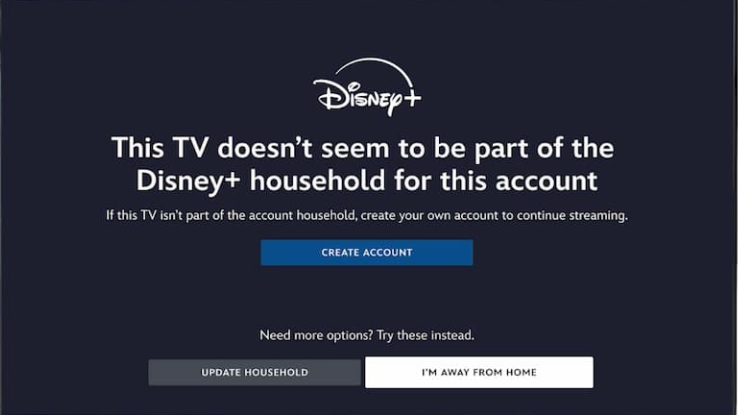
Disney+ gives you two ways to handle out-of-town watching:
- I’M AWAY FROM HOME: Use this when you are on a short trip. Just enter the passcode they send via email, and you are cleared to stream.
- UPDATE YOUR HOUSEHOLD: For longer absences, like a winter getaway or frequent business travel, use this option to set your current location as your temporary streaming home.
There is a limit to how often you can update the household, so don’t switch it unnecessarily. And remember, when you update to your location, your family at home may be temporarily blocked from streaming until you switch it back.
The secret to streaming anywhere without internet
Airports. Planes. Remote campsites. Locations like these kill your WiFi and streaming dreams. Downloads solve that!
You can download select Disney+ movies and shows on your phone or tablet to watch offline at a later time. It’s one of the most useful travel features of the app, especially when:
- Your flight doesn’t have WiFi
- Your hotel charges for internet
- You are somewhere with a slow mobile connection
- You have kids who need entertainment without eating up mobile data
Simply open the app and look for the download arrow next to your favorite title. You’ll see a check mark once the download finishes. Then head to the Downloads tab to access everything you saved.
Pro tip: Use WiFi and adjust download quality before leaving home to save storage space and keep data use in check.
How to download Disney+ shows & movies before traveling
Follow these steps to prep your device:
- Open the Disney+ app on your phone or tablet and sign in
- Search for the movie or show you want
- Tap the Download arrow next to the title. For TV shows, download episodes individually
- Go to the Downloads tab to check progress
- Once downloaded, the title will be available offline, anytime
Keep in mind, downloads only stay active for 30 days. Reconnect to the app occasionally to refresh anything you haven’t watched yet.
Using Disney+ abroad
Disney+ works in many countries around the world, but the available content may differ based on your location. Some titles may be unavailable depending on streaming rights in that country. No need to worry if you downloaded something beforehand, though; that’s always yours to watch, even if it’s unavailable in the country you’re visiting.
Languages might also shift based on where you are. Disney+ supports many languages, including Spanish, French, German, Japanese, and more. If your device switches languages based on regional settings, you can always adjust that in your account settings.
How to watch Disney+ with a VPN
If you’ll be away from home, you can still watch Disney+ like you were back on your couch, no matter where you are in the world, with a VPN. A VPN can be used on your phone, tablet, or computer, making you appear to be back home — even when you’re not — so you feel at home no matter where you are. A VPN is a safe and secure way to stay protected online while streaming your favorite content on the go. In addition, you’ll stay safer on public Wi-Fi networks in hotels, airports, or wherever your travels take you.

ExpressVPN is one of the best providers around, at one of the best prices. Currently, you can get a month of service for as little as $5. ExpressVPN is the most-trusted VPN on the market and comes with a 30-day money-back guarantee. ExpressVPN has servers in 94 countries, best-in-class encryption, 24/7 live support, and the fastest speeds available.
Plans that include downloads
To download shows and watch offline, you must be on a Disney+ Premium plan or a bundle that includes Premium options. The ad-supported plans don’t allow downloading. Check your subscription before a trip to make sure you’re on the right one.
Plans that include downloads:
- Disney+ Premium
- Disney+, Hulu Bundle Premium
- Disney+, Hulu, ESPN Premium Bundles
You can also download on Hulu using similar steps if that’s part of your plan.
Caution for family streamers

If your family is streaming at home while you’re traveling, Disney+ may become confused and think someone else is trying to use your account from an unauthorized location. That’s because the platform tracks streaming locations using the primary household settings.
If you need to confirm an “away from home” trip, it may temporarily disrupt your home streaming. Here’s what to do:
- Communicate ahead of time: Let your family know you’re signing in from a new location
- Use downloads: If you want to avoid confusion, download titles before you leave and switch to local viewing only
- Only update the household when necessary: Save it for extended stays
A customer service rep confirmed that frequent location changes can cause more issues, so it’s best to keep things simple.
Pro tips for stress-free streaming on the road
Here is how to make sure Disney+ works smoothly wherever you go:
- Download everything before you leave: Titles, episodes, shorts, etc.
- Sync monthly if you travel long-term: Downloads expire after 30 days without internet access
- Check your plan: Make sure you’re not on an ad-supported plan if you want downloads
- Adjust video quality: Lower quality uses less space and downloads faster
- Remove old downloads: Make space for new content on long trips
- Use kids’ profiles offline: Build a dedicated list if you are traveling with children
Turn travel time into movie time
Long flights. Delayed trains. Quiet hotel rooms. They become prime Disney+ time if you prepare smartly. Download your favorites ahead of time. Discover how the household feature works, so your family stays connected. Keep an eye on your data and storage settings to make the trip smoother.
Streaming shouldn’t stop because you’re on the move. With these tips and a bit of planning, Disney+ stays right in your pocket, ready to dive into a Marvel marathon or Pixar binge wherever the journey leads.

Disney+
Disney+ is a video streaming service with over 13,000 series and films from Disney, Pixar, Marvel, Star Wars, National Geographic, The Muppets, and more. It is available in 61 countries and 21 languages. It is notable for its popular original series like “The Mandalorian,” “Ms. Marvel,” “Loki,” “Obi-Wan Kenobi,” and “Andor.”