Philo user interface review: does budget mean bad?
Philo user interface review: does budget mean bad?
Philo has a reputation as a budget-friendly streaming service, but does that impact the quality of its user experience?


Just what is a Philo, anyway? If you’re a streaming neophyte who is walking away from cable for the first time, Philo is a streaming service that carries many of the same cable entertainment channels you got previously through an internet connection. You can watch a mix of different cable channels with a Philo subscription, and the absence of sports, cable news, and local broadcast networks — while important to some — means the streamer can charge just $33 per month for its Core package.
Philo also has on-demand content from AMC+, as well as access to HBO Max and discovery+ when you create an account. It’s a lot of entertainment for a low price, but what about the streamer’s user interface? Does Philo have a good quality experience in store for users, or is it a bit clunky and hard to manage? I scored several aspects of the streamer’s UX for you here, so check out what one experienced streaming user thinks below.
How I felt about using the Philo interface
Does Philo have a great home page?
Try as I’d like to kick this section off with a complaint — what’s the point of writing a review if you can’t be a little critical — it was hard to find much reason to be upset with the Philo home page. The streamer doesn’t do any of the things that cause me to instantly deduct points — no autoplay live channels at the top of the screen, no pop-out windows that follow you around as you’re trying to browse, and no long scroll to find the continue watching row.
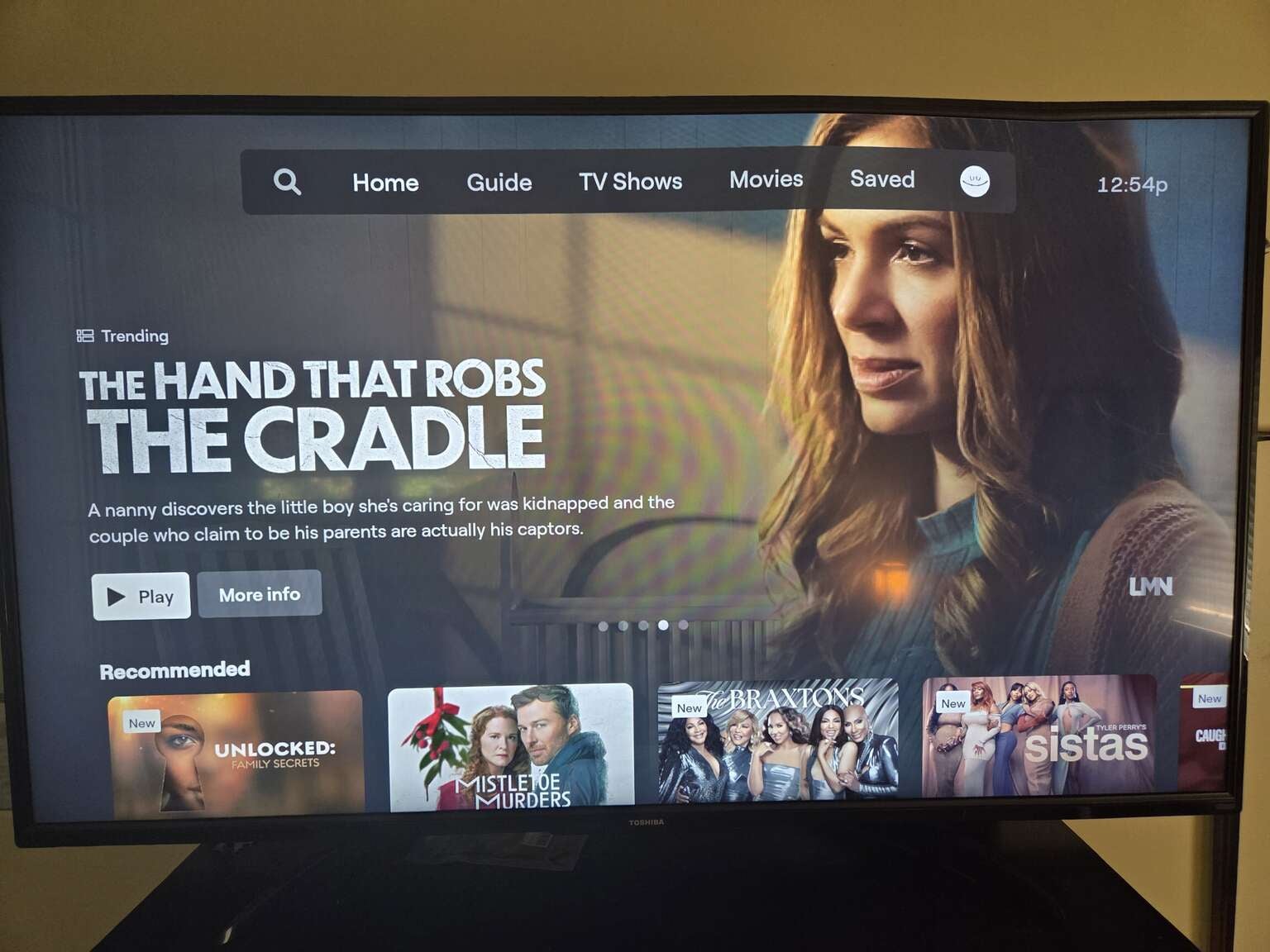
Nothing about the Philo home screen makes it actively more difficult to use, which is a big plus. Click to expand.
Keep Watching on Philo is just two rows from the top of the screen. The home page starts you off with the more-or-less standard carousel of trending titles, followed by a row of recommended options. Keep Watching is the third row, and then you’re off to the races with rails like Featured on AMC+, New & Upcoming, and… that was it. The vertical scroll of recommendations rows on Philo was pretty short, though it may grow larger as one uses the service more and inputs more data into its algorithm.
The home screen on Philo is a bit abbreviated, and the recommendation rows you get when you first start using the service are fairly boilerplate. However, if those are the only complaints I can register, there’s really not a big score deduction to be had for this aspect of the streamer’s UX.
Home page score: 8 out of 10
How easy is content discovery on Philo?
Content discovery is a pretty simple matter on Philo, starting with the fact that you can find the search icon right at the top of the screen in your connected TV app. This allows you to search by title or by channel name, giving you an easy way to find the programming you want if you have a specific option in mind.
The Philo electronic programming guide is fairly basic on my TV app. It lists channels in alphabetical order, and there’s really no way to change that that I could find. If you have a specific channel you want to watch on Philo and it’s a bit later in the alphabet, I’d recommend using the search function instead.
Content discovery score: 7 out of 10
Can you move between categories easily on Philo?
Yes, it’s definitely easy to move between categories with a Philo subscription. The service lets you navigate via a menu of tabs at the top of the screen, which includes Search, Home, Guide, TV Shows, Movies, and Saved, where you will see all the content you record with Philo’s DVR feature.
The TV Shows tab allows you to browse by genre at the top of the screen, with options like Comedy, Reality, and Crime & Drama to help you narrow your choices down right off the bat. You can also see new episodes and a lot more content rows in these tabs, showing that Philo prefers to keep a cleaner home screen by keeping these content carousels segmented in the on-demand sections of its UX.
Category switching score: 9 out of 10
How are Philo’s playback controls?
Philo has pretty good playback controls when viewing on-demand content. The streamer allows you to skip to the next episode in the show you’re watching, toggle subtitles, see info about that title, or save it to your DVR, along with the standard controls to pause, fast-forward, and rewind with your remote.

Philo’s on-demand playback controls do a good job of replicating top streaming services. Click to expand.
The playback controls on live TV are basically exactly the same, except they have a skip to live button instead of skip to next episode. There are no flashy extras like recommended on-demand titles or a menu of previous live channels when you open the playback controls on Philo, but I feel like I have pretty much everything I need when I use them.
Playback controls score: 9 out of 10
Does Philo let you skip opening and closing credits?
No, unfortunately, there is no skip credits button that pops up automatically when you’re watching on-demand titles on Philo. However, you can always skip the opening credits by jumping ahead a few seconds on your remote, and skip the closing credits by clicking the next episode button in the playback controls.
Skipping opening and closing credits score: 3 out of 10
Final thoughts
If you’re going into a Philo subscription thinking that the lower price relative to your previous cable subscription means you’ll have a lower quality experience, I’m happy to report that’s not the case at all. Philo may not be packed with the extras that other streaming interfaces have, but many times streamers struggle to deploy all those features effectively, and they end up wasted or in the way somehow.
Philo keeps things streamlined, without sacrificing the essentials. One thing viewers should note about the Philo interface while they browse it: while the streamer keeps on-demand content from the AMC+ platform on its app, customers will have to use different apps to watch the discovery+ and HBO Max subscriptions included in their service. Still, I came away from my attempt at using Philo’s user experience impressed.
Overall score: 8.5 out of 10

Philo
Philo is a live TV streaming service designed for entertainment lovers, offering flexible ways to watch without the high price of traditional TV bundles. The service now features two paid plans — Essential and Bundle+ — alongside its existing free streaming offering, giving customers a range of options depending on how much live and premium content they want.