How to use subtitles on Hulu and Hulu + Live TV
How to use subtitles on Hulu and Hulu + Live TV
Hulu provides a variety of different subtitling options. We’ll let you know what they are and show you how to turn them on.

Hulu and Hulu + Live TV have some pretty great programming options available. From originals like “The Bear” to next-day streams of primetime shows from ABC and Fox, Hulu has a great selection of on-demand titles. Hulu + Live TV also includes the Hulu catalog and adds a package of 90+ top cable channels to the equation.
These services like to make life easy for deaf and hard-of-hearing customers. The streamers have subtitle options available and easy to find, and we’ll show you how to turn those subtitles on and explain more about your options here.
Everything you need to know about subtitles on Hulu and Hulu + Live TV
How to turn on subtitles on Hulu and Hulu + Live TV
When using Hulu or Hulu + Live TV on a smart TV, first start the title that you want to watch with subtitles. Then, press the up button or swipe down on your remote to pull up the playback bar. Press or swipe up again to find the gear-shaped Settings menu icon, then toggle subtitles on or off.
If you’re watching on mobile, tap the Settings icon during playback. Under Subtitles & Captions, tap Auto, On, or Off to adjust. Then tap the X to save preferences and resume the show or movie you’re watching.
On the web, start playback and click the Settings icon. Navigate to the Subtitles & Audio menu, then choose an available language or set to off.

This is where you’ll find the subtitle options on Hulu’s interface. Click to expand.
What languages are available on Hulu and Hulu + Live TV?
On some Hulu titles, viewers can watch with subtitles in English and Spanish. The availability of Spanish subtitles can vary, so check with each title you want to see in Spanish on the service.
Will Hulu remember your subtitle choices?
Yes, turning on subtitles on Hulu will leave them on until you choose to turn them off again.
Can you adjust subtitle appearance on Hulu?
Yes, you can tweak the appearance of your subtitles on Hulu. Just follow the instructions listed above for various devices to get into the subtitles menus on smart TV, web, or mobile platforms, and adjust any of the following to your liking: font, font color, font opacity, font scaling, font edge style, background opacity, background color, window opacity, and window color.
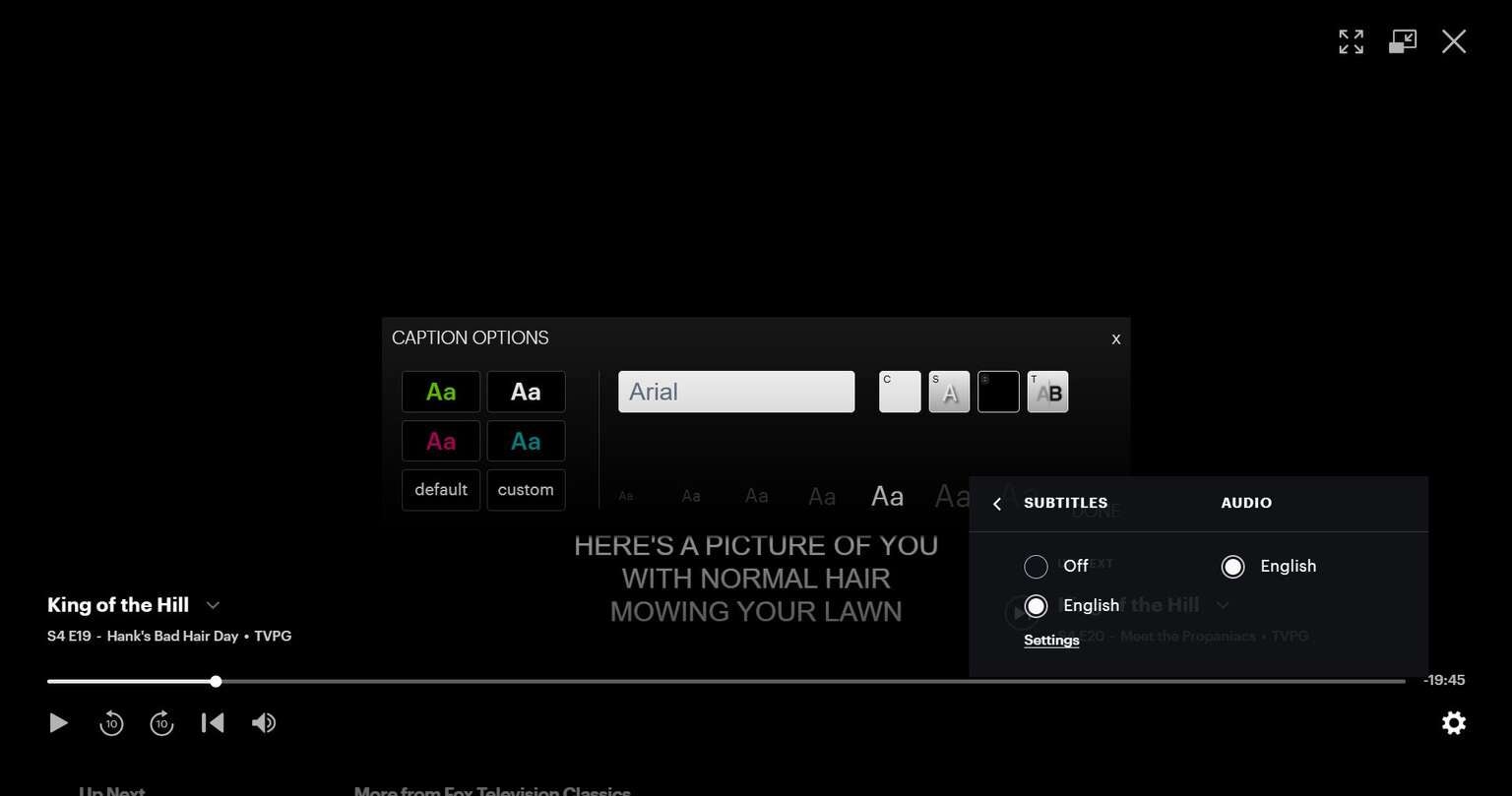
An example of how you can adjust subtitle appearances on Hulu. Click to expand.

Hulu
Hulu is a video streaming service that gives access to thousands of full seasons of exclusive series, hit movies, kids shows, and Hulu Originals like “Only Murders in the Building,” and “The Handmaid’s Tale.”