Here’s how to set up Tubi’s parental controls
Here’s how to set up Tubi’s parental controls
As a free streamer, does Tubi give parents the same level of control over adult content as paid services do?


So you want to gather around the TV for movie night with the family, but you’ve run through everything available with your paid streaming subscriptions, and there’s no room in the month’s budget for another service. Have you tried Tubi? This free streamer has a ton of family-friendly content, along with titles that are definitely more for mom and dad only.
But if you’re hoping to give the kids free rein to watch Tubi while you’re not there, you definitely need to know about the parental controls used by the streaming service. Tubi does offer some options to restrict content, and we’ll tell you more about them below.
How to use parental controls on Tubi
Can you use parental controls on Tubi?
Yes. It’s easy to use parental controls to help keep kids away from shows and movies they shouldn’t be seeing. To do this, open the Tubi website on your browser. Then:
- Locate the profile icon in the upper-right corner of the screen.
- Click Account Settings.
- Find Parental Controls.
- Set the maturity level you wish to enforce.
- Enter your account password to save your choice.
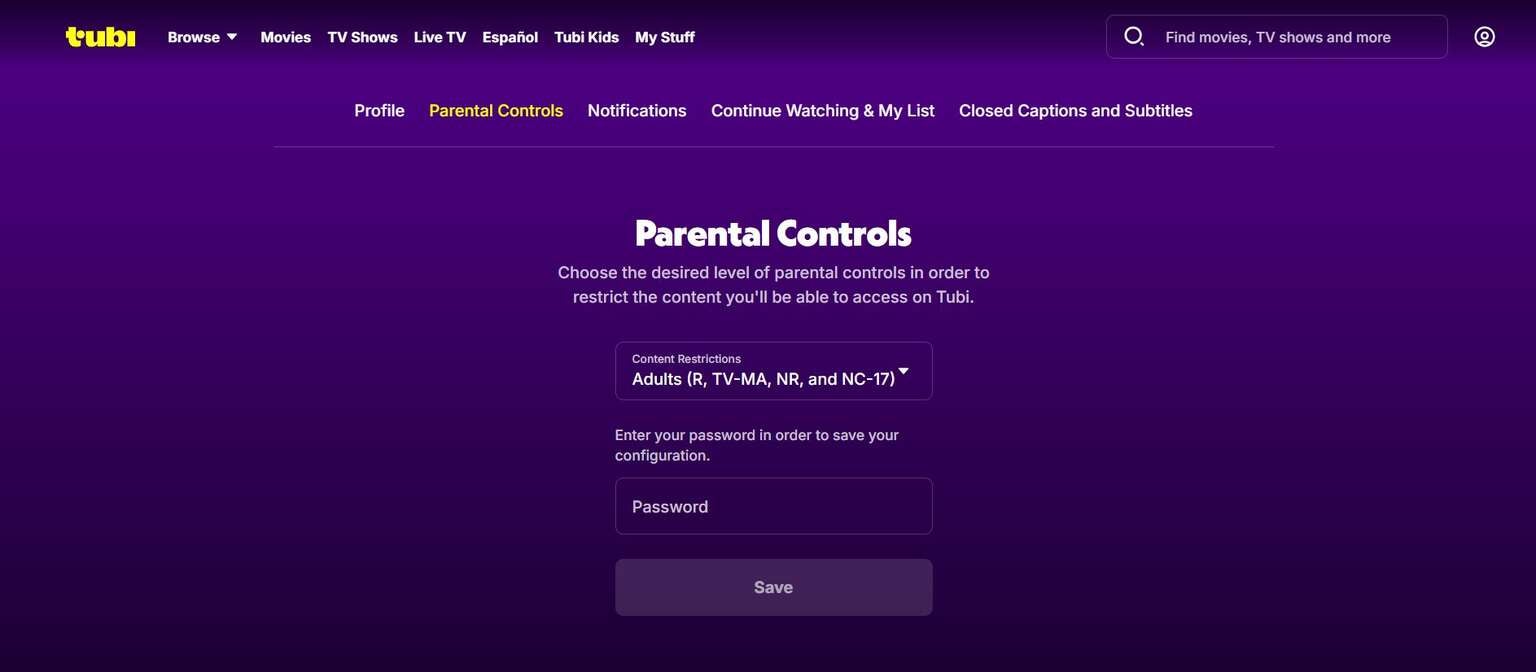
Click to expand.
Do you need a Tubi account to use parental controls?
Yes, you need an account so that Tubi can enforce parental controls and prevent unwanted changes through the use of your password. If you do not create an account, you will not be able to use parental controls on Tubi. The good news is, a Tubi account is always free to create.
What maturity levels can you set Tubi to?
You can change your Tubi settings to allow the following content levels:
- TV-MA, R, NR, NC-17 (Adult)
- PG-13, TV-14 (Teens)
- PG, TV-PG, TV-Y7 (Older Kids)
- G, TV-G, and TV-Y (Little Kids)
What is Tubi Kids mode?
Tubi Kids is an alternate user interface view that you can click on to filter out all non-kids content from the home screen. Keep your hand on the remote, though, because you can click out of Tubi Kids without having to enter a password.
Are there kids’ profiles on Tubi?
No, since Tubi does not use the profiles feature in the traditional sense. You will have to adjust parental controls with every viewing session when watching Tubi.

Tubi
Tubi is a free video streaming service that includes on-demand access to 200,000+ movies and TV episodes - more than any other streaming service. Its ad breaks are shorter and less frequent than most free services. Fox executives have called their service “TV on steroids.”