How to add a new profile on Prime Video
How to add a new profile on Prime Video
Prime Video offers accounts for the whole family, and it’s easy to set them up.

Prime Video is something of a hybrid platform; it comes with a huge amount of e-commerce integrations, which makes sense since it’s owned by Amazon. That means you’re almost continuously offered something to rent while browsing Prime Video, unless you click into the Prime tab that shows only the titles available with your subscription.
Like most other on-demand streaming services, however, Prime Video offers the ability to set up different profiles, so that each user in a household can track their own viewing history and get personalized recommendations. But how do you set up a Prime Video profile, and what kind of control over profiles does the account owner have? Learn more here.
Everything you need to know about profiles on Prime Video
How many profiles can you have on Prime Video?
Prime Video customers can create up to six profiles: the original account holder’s, plus five more. It’s a useful feature to have, since Prime Video allows you to watch a huge catalog of TV shows and movies — being able to separate your viewing history from everyone else in the family will be key.
How to set up a new profile on Prime Video
On the Amazon website
- Click the Prime Video tab.
- Hover over the profile icon in the top-right corner of the screen.
- Click Profiles in the drop-down menu.
- Click Manage Profiles to add or adjust profiles.
- Choose a name, a profile icon, and kids’ profile settings.
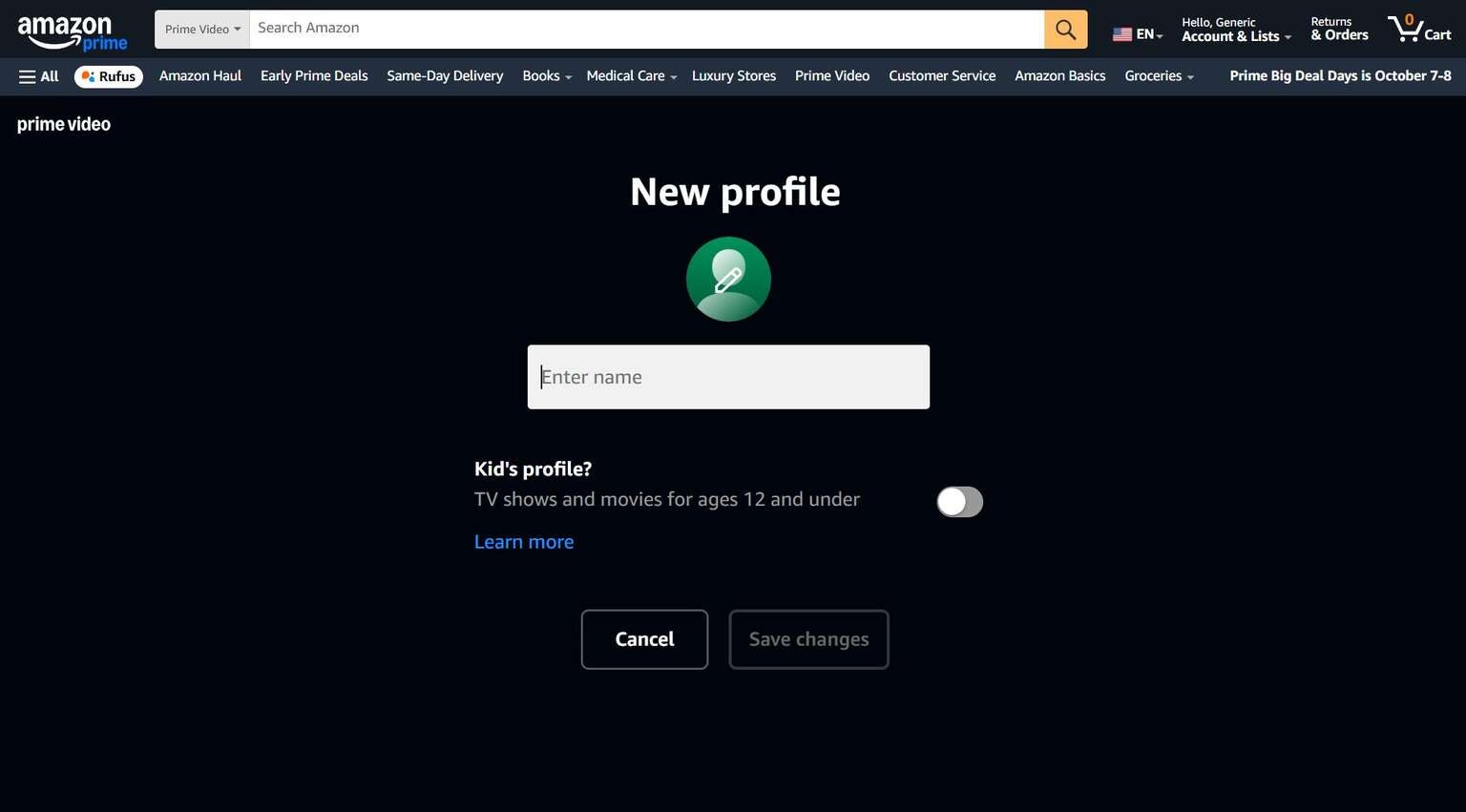
The profile creation screen on Prime Video’s website. Click to expand.
On the Prime Video smart TV app
- Open the left-hand menu with your remote.
- Scroll up to the active profile icon.
- Click to open the profile selection and creation screen.
On the Prime Video mobile app
- Open the Prime Video app on your device.
- Locate the profile icon and click Switch profiles.
- Create a new profile from this screen.
Can you set up kids’ profiles on Prime Video?
Yes, you can add a kids’ profile to Prime Video that will restrict viewing of adult content for users 12 and under. Prime Video kids profiles are unable to stream any content past the restrictions set by the account owner. It’s important to note, however, that anything downloaded from an adult’s profile will be visible to kids’ profiles as well.
Search results and suggestions will be filtered with kids’ profiles, and purchases like additional streaming subscriptions or TV show and movie rentals are not allowed from these accounts either.
Can you restrict purchases on Prime Video?
Yes, the account owner can restrict purchase power on Prime Video across all other profiles, not just kids’ profiles. To do this:
- Head to the Prime Video website
- Click the profile icon, and click Account & Settings.
- Find the Permissions tab, and scroll down until you see the toggle to restrict purchases on your Prime Video account to just yourself.
Can you delete profiles on Prime Video?
Yes, simply head to the Manage profiles screen on any of your Prime Video devices. Here you will find the ability to delete profiles whenever you wish.

Prime Video
Prime Video is a subscription video streaming service that includes on-demand access to 10,000+ movies, TV shows, and Prime Originals like “The Lord of the Rings: The Rings of Power,” “Jack Ryan,” “The Marvelous Mrs. Maisel,” “The Boys,” and more. Subscribers can also add third-party services like Max, Showtime, STARZ, and dozens more with Prime Video Channels. Prime Video also offers exclusive live access to NFL Thursday Night Football.