How to download shows and movies to watch offline on Netflix
How to download shows and movies to watch offline on Netflix
Netflix lets you download many of its titles for watching offline, and we’ll show you how to use this feature here.


One of the most convenient things about having a phone is that it can carry your media wherever you go. Streaming subscriptions like Netflix are easy to watch on your phone with a solid internet connection, but what if you’re going into a place where you know you’ll need to kill some time, but your connection will be spotty or non-existent?
For those long airplane or car rides, or any other time you need some reliable entertainment without a steady internet connection, Netflix allows you to download shows and movies for offline viewing. But how do you use Netflix’s downloads? We’ll help you download like a pro on your Netflix account, and make it easy to get your favorites onto your device to watch any time you want.
Everything you need to know about downloads on Netflix
Can you download titles on every Netflix plan?
Yes, you can download titles on each Netflix plan, including the Standard with Ads tier. However, there are download limits associated with the ad-supported Netflix plan; ad customers can only download 15 titles per calendar month with their subscription on two total devices.
Ad-free plans can have up to 100 downloads a time per device, but there is no monthly limit on these plans.
What devices can you use to download titles on Netflix?
You can download TV shows and movies with Netflix on the following devices:
- Android phones and tablets
- iPhones and iPads
- Amazon Fire tablets
- Google Chromebook (as long as the Google Play Store is installed)
How to download a TV show or movie on Netflix
To download a movie or TV show on Netflix, all you have to do is open the Netflix app while using a compatible device. The download button will be located front-and-center in your interface; on my Android phone, the Download button is placed right under the Play button.
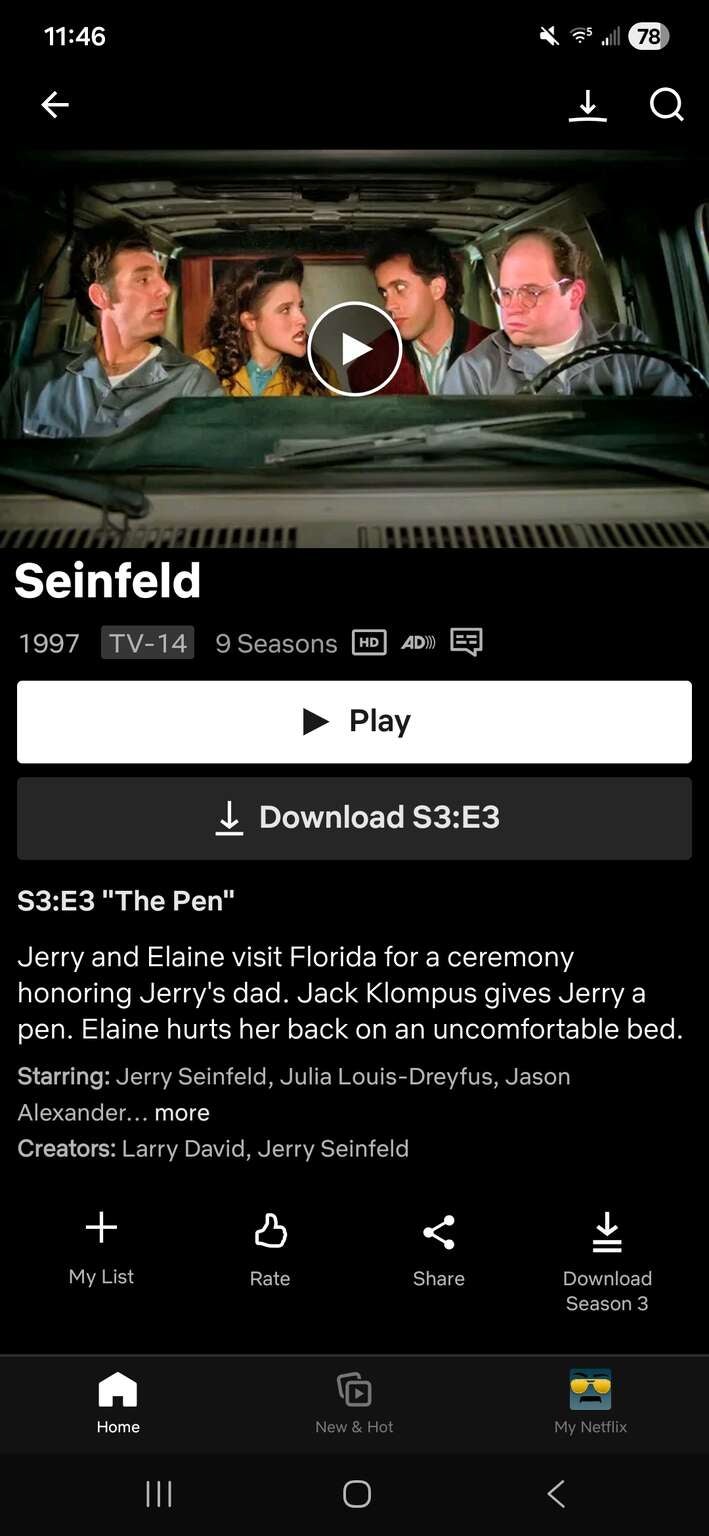
Click to expand.
To watch downloaded titles, open the Netflix app and find the Download logo. From here, you’ll be able to see your downloaded titles, and you can tap play to watch your chosen one.
What download features are available on Netflix?
Netflix has what it calls “Smart Downloads” available on ad-free plans. This automatically downloads TV shows and movies to your device, and it’s easy to use. First, we’ll tell you how to turn Download Next Episode on or off:
- Open the Netflix app on an Android phone or tablet, iPhone, or iPad.
- In the lower-right, tap My Netflix.
In the top-right, click Menu. - Click App Settings.
- Under downloads, tap Smart Downloads.
- Toggle Download Next Episode on or off.
In this section, you’ll also see the option to switch on Downloads for You. This allows Netflix to automatically download shows and movies that it thinks you might like based on your viewing history. This feature is also only on ad-free Netflix plans, and can only be used on iPhones, iPads, or Android phones and tablets.
Are all shows and movies on Netflix available for download?
Many Netflix shows and movies are available to download for offline viewing, but not all. Licensing agreements, regional restrictions, and other factors can cause a title not to be available for download on Netflix, no matter what device you are using or the strength of your internet connection.

Netflix
Netflix is a leading subscription-based video streaming service that offers on-demand access to an extensive library of over 3,000 movies, 2,000+ TV shows, and a growing collection of acclaimed Netflix originals. Renowned for producing groundbreaking content, Netflix has become a cultural powerhouse with hit originals like “Stranger Things,” “Wednesday,” “Squid Game,” “The Crown,” “Tiger King,” “Bridgerton,” “The Witcher,” and “Black Mirror.”