Skip to Content

Add The Streamable as a preferred source on Google to see more streaming news and deals.

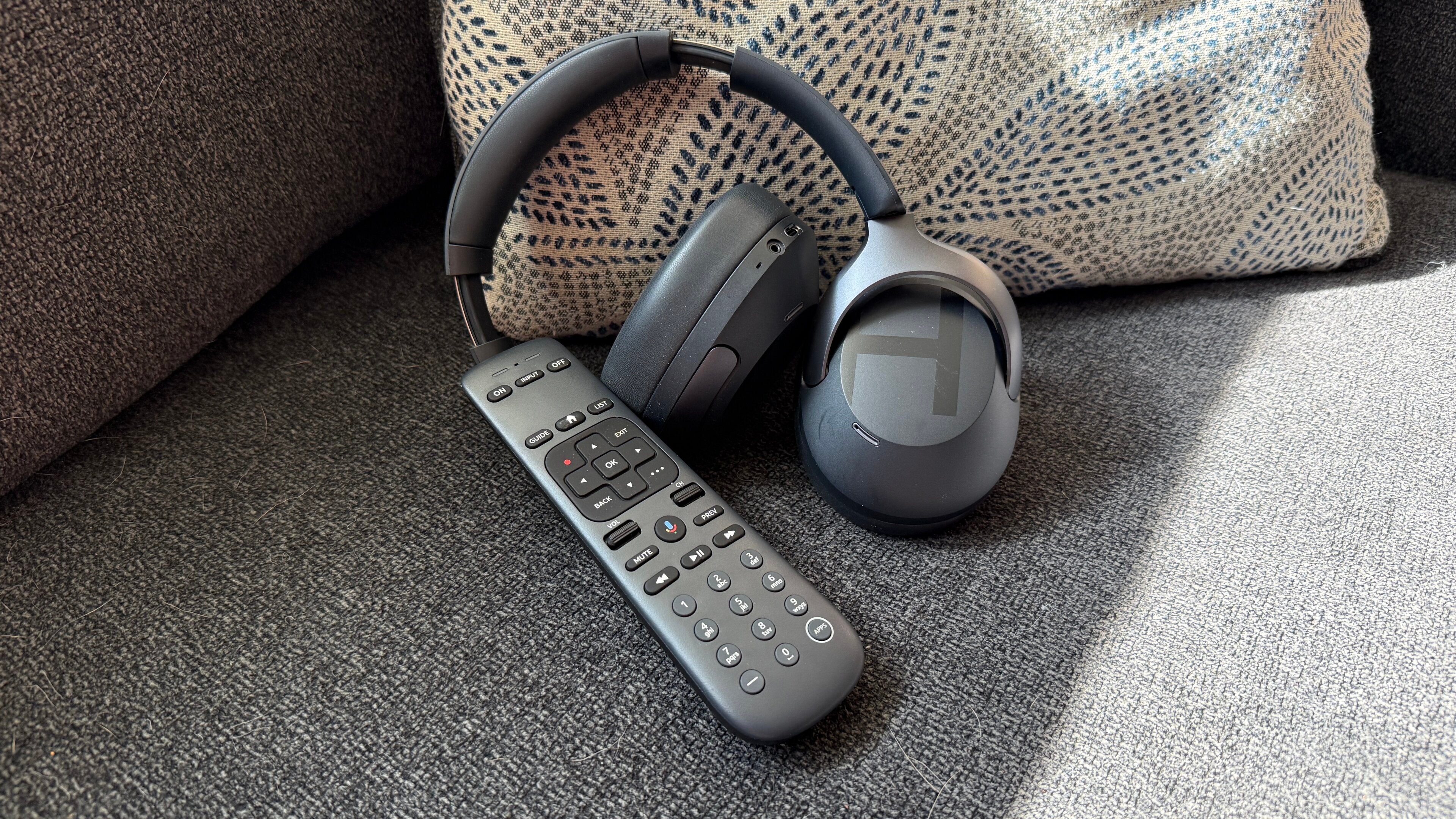
Use Bluetooth headphones with your Gemini Air for ultimate private listening

Use Bluetooth headphones with your Gemini Air for ultimate private listening

More immersive sound without bothering anyone else just by pairing headphones.

As a cord-cutter since 2010, he’s spent over 15 years covering tech and streaming for sites like TechRadar, Tom’s Guide, and CrackBerry. He also has a soft spot for '80s movies.

If you’ve ever tried watching TV late at night while someone else was sleeping — or just wanted a more immersive, personal listening experience — you already know how clutch headphones can be. That’s where Bluetooth audio on the DIRECTV Gemini Air really shines. Instead of being locked into your TV’s built-in speakers or your home’s massive surround sound system, you can route everything straight to your headphones and instantly turn your living room into a private theater, or let your partner sleep while you enjoy the latest episode of your favorite show in peace.

It’s one of those features that doesn’t always get enough attention, but once you use it, it’s hard to go back. Whether you’re catching a big game without waking the house, binge-watching a series in full immersion, or just trying to cut down on background noise (or loud kids), wireless headphones give you a level of freedom that traditional TV audio simply doesn’t.

The DIRECTV Gemini Air makes this especially convenient because it’s built on a modern streaming interface (Google) with native Bluetooth support. That means you don’t need extra adapters, sound systems, or workarounds to connect your device — just pair your favorite Bluetooth headphones as you would with a phone or tablet, and you’re set. It’s a small setup step that pays off immediately in comfort, flexibility, and overall viewing quality.

Everything you need to know to pair your Bluetooth headphones to a DIRECTV Gemini Air

How to pair Bluetooth headphones to DIRECTV Gemini Air

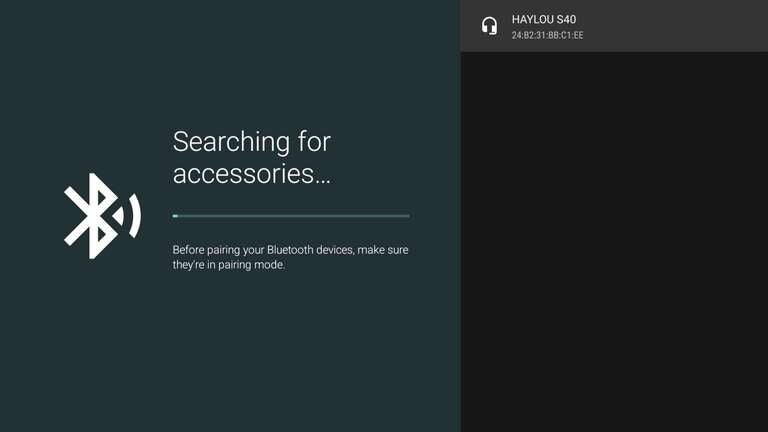
  • Put your Bluetooth headphones or earbuds into pairing mode (usually by holding the power/Bluetooth button until the indicator flashes).
  • On your Gemini Air home screen, go to Settings, then navigate to Remotes & Accessories
  • Select Add a new Bluetooth device
  • Wait for your headphones to appear in the list of available devices on the right
  • Select your headphones to connect
  • Confirm audio is working by playing live TV or a streaming app
  • You’re done!

Benefits of using Bluetooth headphones with Gemini Air

Using Bluetooth headphones with the DIRECTV Gemini Air really changes the way you experience TV. It gives you private listening, so you can watch anything without disturbing others in your home, which is especially useful in shared spaces or apartments. The audio also feels more immersive and focused — dialogue comes through more clearly, sports commentary is easier to follow, and sound effects feel tighter and more direct, almost like you’re pulling everything straight into your ears instead of filling the room (I guess technically, you are). Of course, this all depends on the quality of the headphones you’re using as well (more on that below).

It’s also a great setup for late-night viewing since you don’t have to worry about volume at all, and you don’t need any extra hardware like soundbars or adapters to make it work. Once it’s paired, switching is simple too — you can easily disconnect or reconnect your headphones through settings whenever you want, making it a flexible option that fits naturally into how you already use your TV.

Quick tips if something goes wrong

  • Make sure your headphones aren’t still connected to another device (like your phone)
  • Restart your headphones and also the Gemini Air if the device doesn’t show up
  • Check headphone “low latency” or “gaming mode” settings if you notice audio delay

Our favorite Bluetooth headphones

Need a great pair of headphones or earbuds for private listening on your Gemini Air device? You can get by with nearly any Bluetooth headphones you probably already have, but if you really want to up your game, here are some of our favorites.

Listen up!

Once you’ve paired Bluetooth headphones to your Gemini Air, it becomes one of those “why didn’t I do this sooner?” upgrades. It’s simple, fast, and instantly changes how you experience TV — especially if you value quiet viewing or more immersive sound.

Whether it’s a late-night movie, a big playoff game, or just your daily background binge, wireless audio makes the whole setup feel more personal and a lot more flexible.

DIRECTV

DIRECTV is one of The Streamable’s top choices for the best live TV streaming service overall in 2026, especially for users who want the most channels or want to watch the most live sports. With an unbeatable lineup of local, news, sports, and entertainment channels, three main signature packages, an unlimited DVR, and 20 simultaneous streams at home, DIRECTV remains a premier choice for any cord-cutter.

…

Following the launch of several genre-specific Genre Packs, there are now even more flexible ways to watch DIRECTV. Options like MySports, MyEntertainment, MyNews, and MiEspañol provide affordable, targeted alternatives to larger bundles, allowing viewers to subscribe to a specific set of channels that match their interests without the cost of a full lineup.

DIRECTV starts at $59.99 / month for its Entertainment package. You can access your local regional sports network with the Choice package, which begins at $64.99 / month, as well as the MySports Pack $44.99 / month. At the top end, they also have an Ultimate ($94.99) for 218 channels. Slimmer Genre Packs for entertainment and news are MyEntertainment for $42.99 / month and MyNews $39.99 / month. There is no contract or broadcast TV fees with this DIRECTV streaming option.

The service was previously called DIRECTV STREAM, preceded by AT&T TV.

How much does DIRECTV cost in 2026?

DIRECTV now offers flexible entry points starting at $19.99/month for the MyKids Genre Pack, while full Signature Packages like Entertainment start at $84.99/month. See the full list: DIRECTV Pricing & Plans

Does DIRECTV have a free trial?

Yes, DIRECTV offers a 5-Day Free Trial for new customers, which includes access to your chosen package and any added Genre Packs.

What are DIRECTV Genre Packs?

Genre Packs are targeted, contract-free plans introduced in 2025. They include MySports ($69.99/mo), MyEntertainment ($34.99/mo), MyNews ($39.99/mo), and MiEspañol ($34.99/mo), often bundling apps like Max, Disney+, or Hulu.

How many channels does DIRECTV have?

The channel count varies by plan: the Entertainment package starts with 90+ channels, while the Premier package offers over 185+ channels. See the full list: DIRECTV Channels.

How many streams are allowed at once on DIRECTV?

DIRECTV allows for unlimited simultaneous streams on your home network and up to 3 streams while on the go. See more details: DIRECTV Simultaneous Streams

Does DIRECTV include local channels?

Yes, local affiliates like ABC, CBS, Fox, and NBC are included in all Signature Packages and the MySports Genre Pack in most markets. See the full list: DIRECTV Local Channels.

Does DIRECTV have live sports?

DIRECTV is a leader in sports, offering ESPN, FS1, NFL Network, and MLB Network, plus Regional Sports Networks (RSNs) in the Choice plan and above. See the full list: DIRECTV Sports Channels.

Does DIRECTV offer premium channels?

Yes, you can add Max, Paramount+ with SHOWTIME, STARZ, and Cinemax. Many 2026 Genre Packs now include these services as part of the base price. See the full list: DIRECTV Premium Channels.

Does DIRECTV offer 4K streaming?

DIRECTV provides dedicated 4K channels (104-106) for live sports and special events at no extra cost, provided you have a compatible 4K device.

Does DIRECTV have a DVR?

Every DIRECTV plan includes Unlimited Cloud DVR storage, allowing you to record and save shows for up to 9 months.

Is there a Regional Sports Network (RSN) fee on DIRECTV?

An RSN fee of up to $15.99/month applies to the Choice package and above, as these plans include local sports coverage. This fee is determined by your zip code and the number of Regional Sports Networks available in your area.

Can I avoid the RSN fee on DIRECTV?

Yes. To avoid the RSN fee, you can subscribe to the Entertainment package or the MySports Genre Pack ($69.99/mo), which bundles sports content without a separate itemized RSN charge. See the breakdown: DIRECTV RSN Fees & Locations.

5-Day Trial

Start streaming DIRECTV & save up to $30 off your 1st mo. of service! Learn how.


Adam Zeis is the Managing Editor of The Streamable, where he oversees all site content and leads a dynamic team of freelancers. With over 15 years of experience in tech media, Adam has developed a deep expertise in streaming entertainment, technology, and content creation. His passion for the streaming landscape began when he cut the cord in 2010. Since then, he has dedicated his career to exploring and sharing insights on the ever-evolving digital entertainment space.

Add The Streamable as a preferred source on Google to see more streaming news and deals.

DIRECTV Cash Back

Let us know your e-mail address to send your $50 Amazon Gift Card when you sign up for DIRECTV STREAM.

You will receive it ~2 weeks after you complete your first month of service.

Sling TV Cash Back

Let us know your e-mail address to send your $25 Uber Eats Gift Card when you sign up for Sling TV.

You will receive it ~2 weeks after you complete your first month of service.

Hulu Live TV Cash Back

Let us know your e-mail address to send your $35 Amazon Gift Card when you sign up for Hulu Live TV.

You will receive it ~2 weeks after you complete your first month of service.