Sling Freestream’s new feature lets you channel surf on Roku devices
Sling Freestream’s new feature lets you channel surf on Roku devices
This new feature eliminates some of the pain points that often come from trying to navigate streaming content.


For many cord-cutters, one of the most frustrating aspects of transitioning away from a traditional TV-watching experience is how difficult it is to change between streaming services and channels. While nearly all of the content that viewers are used to from broadcast and cable TV is now available on streaming, the ease and familiarity that consumers are used to has long been difficult to replicate for streamers. However, now some Sling Freestream users with Roku devices are discovering that they have access to a new way to browse channels on the free service.
Key Details
- Sling Freestream has added a new channel surfing feature for Roku users.
- Users can easily hop into the new mode, showing a dynamic list of channels to scroll through.
- The feature may not yet be available for all users.
Since launching just over one year ago, Sling Freestream has quickly become one of the best and most innovative free ad-supported streaming TV (FAST) services on the market. The latest addition to the platform allows users to easily surf through channels without having to navigate a clunky guide or wait too long for each channel’s content to load. Currently, the feature is only available to select Roku users, but presumably it will role out to all users on all platforms in the future. The Streamable has reached out to Sling about plans for the feature and will update the article if any new information is learned.
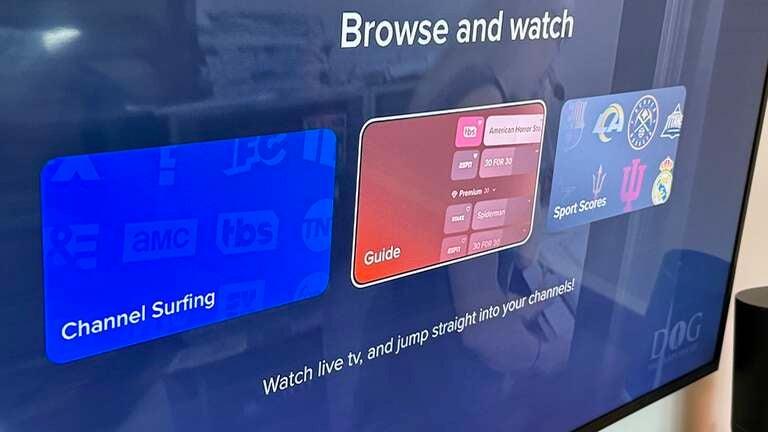
The latest feature, aptly named Channel Surfing, which was first noted by Cord Cutter News, does exactly what its name says. When watching a FAST channel on Roku, pressing the up button on your remote will activate this new mode. A channel list will appear on the left side of your screen, allowing you to browse available options seamlessly. The list contains the standard fare of Freestream channels you would find on the traditional channel guide, giving you easy access to all of the platform’s programming.
The side-bar-like list is chock-full of live programming, including news, entertainment, reality, and game shows, all easily swapped just by scrolling through the list. While many streaming services overlay a guide similarly, Sling Freestream takes it a step further by eliminating extra clicks. No need to navigate menus or manually select a new channel — simply press the up or down button on your Roku remote, and the channel changes instantly, like the days of cable remotes gone by. This makes flipping through a variety of content — news, game shows, reality TV, comedy, and more — easier than ever.

While I don’t typically pop onto my couch to watch live TV, there are times when I just want to unwind and not have to think too much. Roku is my streaming device of choice, and while my go-to downtime entertainment is usually “The Price is Right”, sometimes I feel like switching things up.
As a streaming expert, I have access to a vast array of streaming apps, and I definitely take advantage of them. I’m a big fan of the classic Roku channels, but I also frequently turn to Tubi, Philo, or Sling Freestream, depending on my mood. Lately, though, Freestream has been pulling ahead as my top choice. And with the addition of a brand-new feature, kicking back with live TV has never been easier.
Sling Freestream is 100% free and operates independently of the paid Sling TV packages. So whether you’re in the mood for a quick channel-surfing session or just want some effortless background entertainment, this feature makes the experience smoother.
-
Sling Freestream
Sling Freestream is a free ad-supported TV service offered through Sling TV, offering one of the largest free live TV lineups available today. Viewers get access to more than 520 live channels and over 41,000 on-demand movies and TV episodes without needing a paid subscription. The service blends live news, sports, entertainment, reality TV, movies, and kids’ programming into a single app experience that works across most major streaming devices.
-
Sling TV
Sling TV is The Streamable’s choice for cord-cutters on a budget. Sling is a live TV streaming service with multiple channel packages. The $45.99/month Sling Orange plan offers about 30 channels, including Disney Channel and ESPN. The $45.99/month Sling Blue plan offers about 40 channels, including ABC, Fox, and NBC in major markets.
You can combine Orange+Blue for a total of $60.99 / month. Sling also offers many channel add-on packages starting at $6/month.

