What are the subtitle options available on Netflix?
What are the subtitle options available on Netflix?
Netflix offers a great range of subtitle options, and it’s easy to use them as well.

The name Netflix has become synonymous with streaming quality, and it’s not hard to see why. The streamer’s originals have dazzled audiences for years now, and its library is also absolutely packed with licensed titles from essentially all the top studios in Hollywood, including Disney, NBCUniversal, Paramount, and Warner Bros. Discovery.
With all that content to watch, viewers might be worried that Netflix has skimped out on its subtitle options. Nothing could be further from the truth, however; keep on reading to find out how to use Netflix’s subtitles, what languages you can watch in, and more.
Everything you need to know about subtitles on Netflix
How to turn on Netflix subtitles
Netflix’s subtitles are quite easy to turn on. Pick the title you want to watch, and start playback to start the process.
Then, find the subtitles button in the playback controls. On the web and the Netflix mobile app, this button is in the bottom-right corner of the screen. On my smart TV, it was in the bottom-center of the screen. Click it, choose your language, and you’re off to the races.
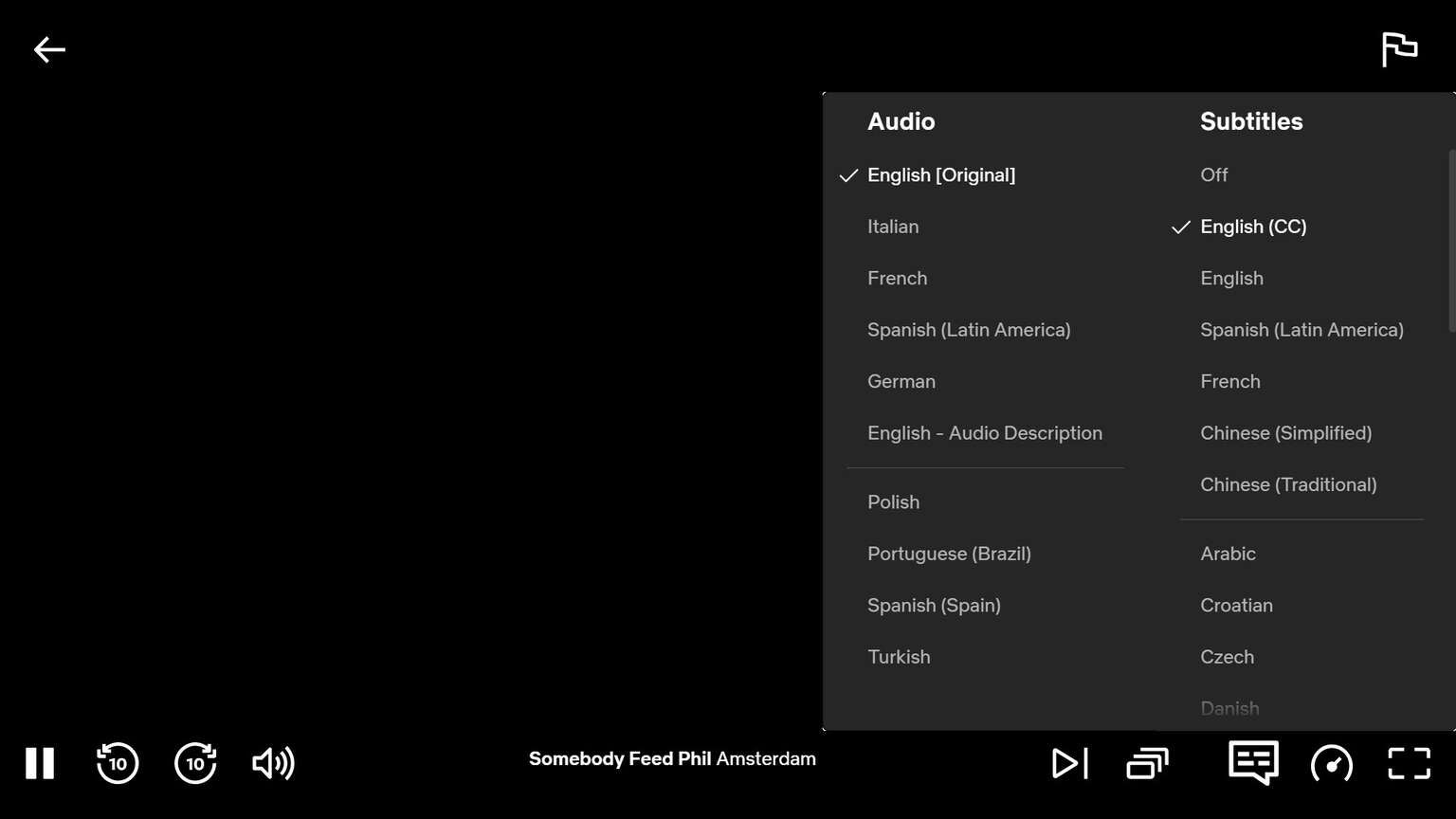
An example of Netflix’s subtitle menu on its website. Click to enlarge.
What languages are available with Netflix subtitles?
Netflix offers a wide range of subtitle language options. Languages include:
English
English (CC)
Spanish (Latin America)
French
Chinese (Simplified)
Chinese (Traditional
Arabic
Croatian
Czech
Danish
Dutch
Filipino
German
Greek
Hebrew
Hungarian
Indonesian
Japanese
Korean
Malay
Norwegian
Portuguese (Brazil)
Portuguese (Portugal)
Romanian
Russian
Spanish (Spain)
Swedish
Thai
Turkish
Ukrainian
Vietnamese
Can you adjust the appearance of subtitles on Netflix?
Yes, it’s easy to adjust the appearance of your captions on Netflix. To do this, click on your profile icon and choose Account from the drop-down settings. Then scroll down to the Edit Settings option, then click Subtitle appearance.
You can then adjust the font, text size, drop shadow, background, and window settings on your Netflix subtitles. Click save, and you’re done!
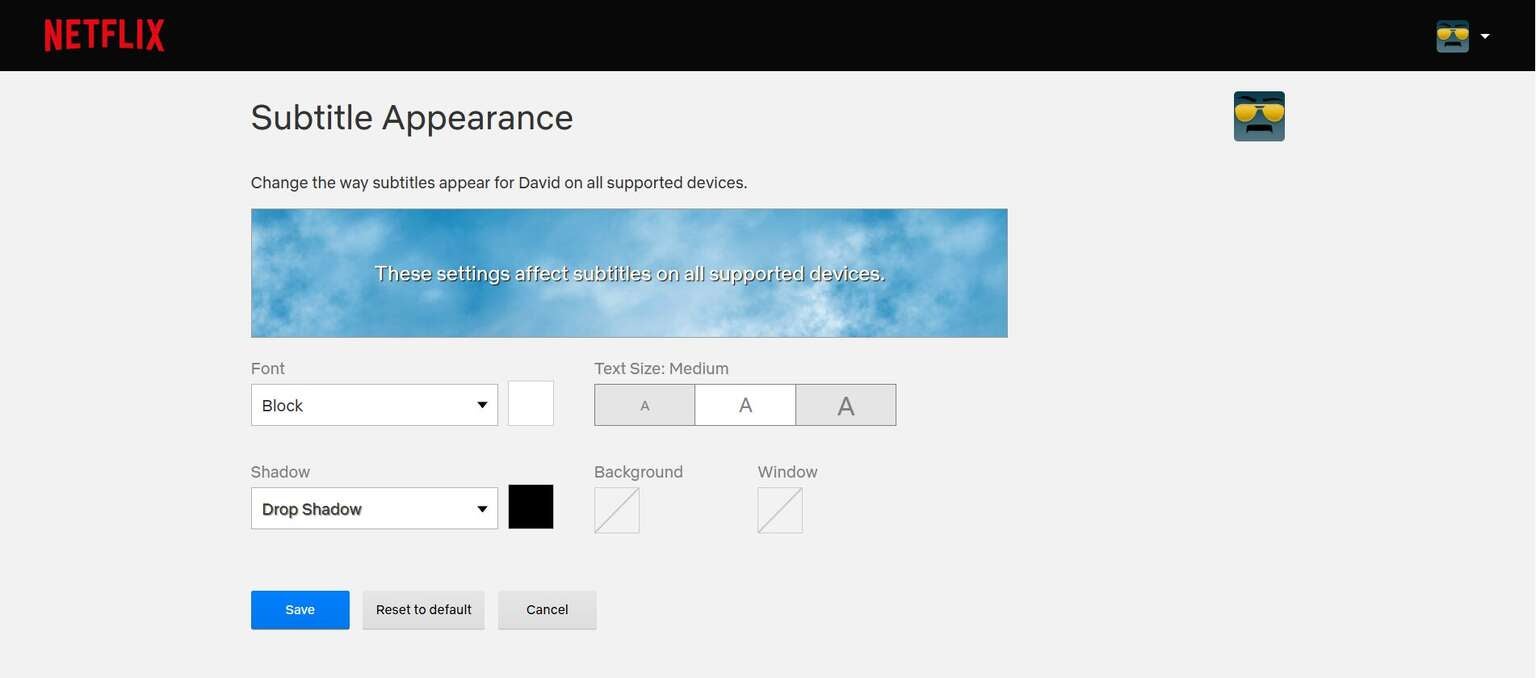
Netflix has plenty of customization options for its subtitle appearance. Click to enlarge.
Are all subtitle languages available on all Netflix titles?
No, the availability of subtitle languages varies from title to title on Netflix. Check each individual show or movie to see which subtitle languages are available.
Will Netflix remember your subtitle choices?
Yes, Netflix will remember your subtitle options if you decide to turn them off. If you want to turn them off again, simply do so using the instructions above for turning them on.

Netflix
Netflix is a leading subscription-based video streaming service that offers on-demand access to an extensive library of over 3,000 movies, 2,000+ TV shows, and a growing collection of acclaimed Netflix originals. Renowned for producing groundbreaking content, Netflix has become a cultural powerhouse with hit originals like “Stranger Things,” “Wednesday,” “Squid Game,” “The Crown,” “Tiger King,” “Bridgerton,” “The Witcher,” and “Black Mirror.”