Gemini Air review: Is DIRECTV’s premium streaming device worth it?
Gemini Air review: Is DIRECTV’s premium streaming device worth it?
A premium streaming device that only DIRECTV subscribers will love.


The Gemini Air is DIRECTV’s straight-to-consumer streaming device, eliminating the need for a separate smart TV, Roku, or Fire TV device. It’s truly plug-and-play, featuring a simple USB-C powered dongle that connects to your TV via HDMI, along with the robust, cable-like Gemini Air remote. The Android-powered setup eliminates pain points and the need for extra hardware, providing DIRECTV users with a straightforward approach to streaming.
Not only can you access your chosen subscription tier for live DIRECTV content, but also all of your favorite streaming apps like Disney+, Apple TV, and Netflix — as well as DVR content — all in one place. The sleek hardware will keep you streaming without issue, and the Gemini Air — one of my favorite remotes — gives everything you need right at your fingertips.

DIRECTV Gemini Air hands-on
Hardware and setup

The Gemini Air reminds me most of the original Google Chromecast TV streamer in appearance. It’s small enough to tuck away inconspicuously behind your TV, but not quite as compact as the newer Roku Streaming Sticks, for example. When firing up the device, the first boot was quite lengthy, but subsequent startups seemed more in line with what you’d expect. Then again, you won’t really be turning the device on and off in most cases, so boot time isn’t a significant issue. The hardware is sleek and streamlined, and for most users, the dongle will be out of sight anyway, so looks don’t matter much.
Setting up is as easy as plugging in, connecting to Wi-Fi, logging in to your DIRECTV account, and optionally logging in to your Google account (it helps keep all Google-related settings synced). From there, the setup process involves selecting your favorite genres, sports, and channels, as well as making a few other preference adjustments, such as layout, audio, and video settings. You also get to choose any ancillary apps to which you may have a subscription, like Netflix, HBO Max, or Apple TV, for example, all of which can easily be accessed from within the Gemini Air interface.
Once you get the housekeeping out of the way, there’s not really much left to tackle other than just streaming away. Setup is extremely easy, and I found the hardware to be smooth overall throughout the process, with only minor hiccups. Navigating around the UI gave me no issues. I noticed a slight lag at first when loading channels, but it seemed mostly due to connection speed, so your mileage may vary.
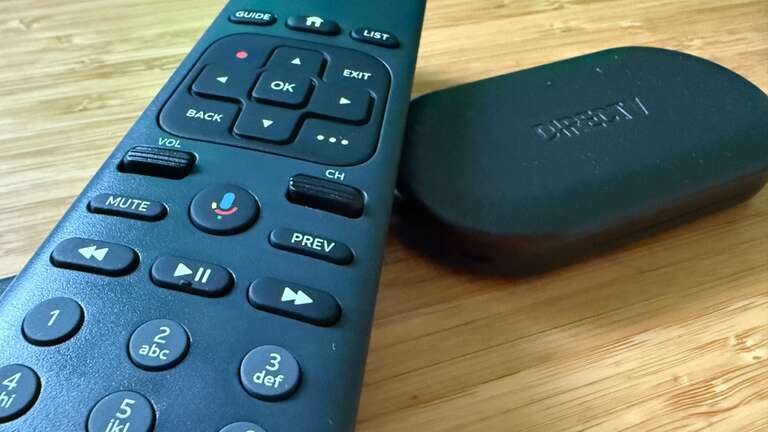
Before we get too far, I do have to say that I also really love the Gemini Air remote. Like really love it. Though it’s obviously much different than the Roku or Fire TV remote you may be used to, it’s extremely robust and well thought out, with menu buttons, channel and volume rockers, and even voice control. It’s much more in line with a typical cable remote that includes channel buttons, navigation, and quick-access controls, so those coming off cable to the Gemini Air should find the adjustment extremely easy.
UI and performance
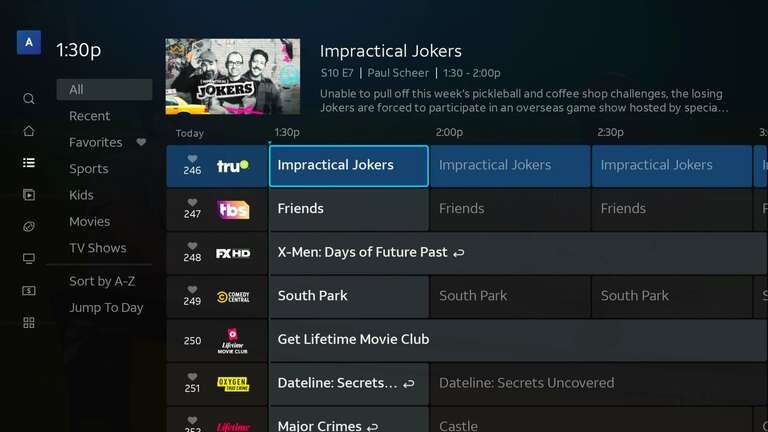
The UI is one of the most streamlined I’ve used on a streaming platform. It’s easy to navigate and find what you need, and I love that it’s very reminiscent of traditional cable, which new cord-cutters will love. You can easily click through live channels or dive into your apps or on-demand content. DVR recordings are also readily available, truly putting everything you need right where you want it.
All of your live channels, third-party apps like Netflix, Disney+, and HBO Max are at your fingertips in a very intuitive layout. I’ll admit I was a bit worried going in that some things that weren’t front and center would be hard to get to, but I found that everything was just a few clicks away. If I did have trouble finding something, once I did it was very much an “oh, that makes sense” moment. I didn’t expect the content from all of my other streaming apps to integrate so well with the Gemini Air, so I was pleasantly surprised.
Performance-wise, the Gemini Air feels snappy and responsive. The only real issue I had was waiting a few extra seconds for channels to load from time to time, which, again, can mostly be pinned to connection speed. Channel changes happen quickly overall, apps open without delay, and the interface rarely stutters or lags — even when switching between live TV, streaming apps, and recorded shows. The layout keeps everything organized and intuitive, with a guide that’s familiar to anyone who has used a set-top box before, but a bit more refined for an all-in-one streaming experience. The one time I did lose Wi-Fi (blame my ISP), the Gemini Air reconnected on its own, and I was back to streaming without even touching the remote.
The voice remote also deserves (more) credit here. You can launch apps, tune to specific channels, or search across live and on-demand content with a quick command, which makes browsing feel effortless. Whether you’re flipping between sports, streaming movies, or catching up on DVR recordings, the Gemini Air delivers a smooth, cable-like experience — only faster and smarter with everything all in one place.
Gemini Air features (and multiview!)
Everyone consumes content differently — some opt to search, some go to their library, and others pick whatever shows up. With the Gemini Air, you can really go about your business and use your preferred methods for finding content with no fuss. Universal search is excellent as it brings in everything from your chosen services for easy access, not just DIRECTV content. You can also use voice control through the Gemini Air remote to search (you can do much more with voice than just searching, though), or simply cruise through your personalized recommendations, which actually get better over time, the more you use the device.
I’m a big smart home guy, and I was stoked to see that the Gemini Air brings along plenty of smarts. Being Android-powered, it easily connects to a multitude of smart home platforms, including Amazon Alexa, Google Assistant, and Home Assistant. If you want to stream media from your phone, tablet, or computer, you can easily do that as well, thanks to the built-in Chromecast. That makes it a natural fit for connected homes, allowing you to integrate entertainment into your broader ecosystem.
If you want to cast videos, music, or photos from your phone, tablet, or laptop, Chromecast is built right in — no extra hardware required. You can even take advantage of Multiview, a standout feature that lets you watch multiple streams at once — perfect for sports fans who want to keep tabs on several games simultaneously. Altogether, the Gemini Air doesn’t just make finding and watching content easy — it makes the whole experience feel unified, intelligent, and personalized.

Universal search is a huge plus here, pulling in results from across your subscribed services so you can find what you want — no matter where it’s streaming. Whether you’re after a specific movie, a show, or a live sporting event, it’s all surfaced together for quick access. If you’d rather skip typing entirely, the built-in Google Assistant voice control lets you do everything from searching for content to opening apps, checking the weather, or controlling smart devices — all with simple voice commands.
Personalized recommendations also play a significant role. Over time, Gemini Air learns your viewing habits and starts surfacing shows and movies you’re more likely to enjoy, helping you discover new favorites without the need for endless scrolling.

I, of course, must mention Multiview, one of Gemini Air’s standout features — especially for sports fans or those who multitask. It allows you to watch up to four live channels or streams simultaneously on a single screen, enabling you to keep an eye on multiple games, news broadcasts, or other events without constantly switching back and forth. The layout is clean and easy to adjust, allowing you to highlight one stream for full audio. The mix channels — local mix and sports mix — are intertwined with the guide, so they are easy to access and favorite.
I got to enjoy football using Multiview, and from someone who hasn’t used anything like it before, it was awesome. The only downside is that the channels are preselected, which I found frustrating; it would obviously be much cooler if you could choose the channels for your mix yourself (or maybe I’m just missing something entirely). Whether it’s Sunday football, March Madness, or a mix of live TV and streaming apps, Multiview makes it simple to stay on top of everything happening at once — all without sacrificing performance or picture quality.
At this point, you’re probably wondering what makes the Gemini Air special since most streamers — including the one you probably already own — can do most of the same stuff. Well, you’re right. I initially thought the exception was Multiview being a Gemini Air-only feature, but after firing up the DIRECTV app on my Roku, I found that wasn’t the case. I have Local Mix, News Mix, and Sports Mix within my DIRECTV app through Roku, so no Multiview device exclusivity whatsoever.
DIRECTV integration and live TV

The obvious real benefit of the Gemini Air is the direct (yes, I went there) integration with DIRECTV. Whereas on Roku for Fire TV, you can simply use the DIRECTV app just like you use Netflix or Prime Video, with the Gemini Air, you get massive integration you wouldn’t usually have. In addition to the DVR capabilities, you get all your live channels, on-demand content, purchased content, sports channels, and 3rd-party apps all working in unison. Not to mention, the remote is much more familiar to TV-style, with channel buttons, a guide button, fast-forward and rewind controls, and more. What you’re really getting is an experience over just using other hardware and running the DIRECTV app.
This tight integration makes live TV feel as immediate and intuitive as traditional cable, but with the flexibility of streaming. You can browse the live guide, flip through channels with virtually no delay, or jump straight into an on-demand show without changing inputs or opening another app. Sports fans, in particular, will appreciate how effortlessly DIRECTV’s live sports channels blend into the lineup, complete with real-time updates and easy access to recorded games or highlights.
The remote itself plays a big part in the experience, too (did I mention I love the remote?). It’s designed with classic TV controls in mind — channel buttons, a dedicated guide button, fast-forward and rewind controls, and shortcut keys for quick navigation. That familiar layout makes it feel like an actual cable box upgrade rather than a streaming stick.
In short, using the Gemini Air with DIRECTV doesn’t just give you access to content — or lock you down to only DIRECTV content — it gives you a complete, integrated entertainment hub. It combines the reliability and familiarity of live TV with the convenience and intelligence of streaming, creating a best-of-both-worlds experience you don’t get on other platforms.
Apps and more

One thing I was worried about before firing up my Gemini Air was that I’d still be stuck slinging two devices — one for DIRECTV and another for everything else. Thankfully, that’s not the case, as you can easily integrate all of your app subscriptions (of which I have many), so you never have to venture outside a single hardware device. You can easily access all of your content — regardless of where it lives — within the Gemini Air as well. The My Library section houses all of your favorite content, regardless of the service.
All your content — whether it’s live TV, DVR recordings, or streaming apps like Netflix, HBO Max, and Prime Video — is right there in one place. The My Library section conveniently gathers your favorite shows, movies, and recordings across services, making it easy to jump back in without having to remember which app each item is located in. Even better, third-party streaming content appears directly in the channel guide alongside your live channels, giving the entire experience that classic, cable-style feel but with far more flexibility. You can scroll through the guide and see not just what’s airing live but also what’s available to stream instantly from other platforms — no input switching, no app-hopping.
It’s this kind of deep integration that makes the Gemini Air feel like more than just another streaming stick. It’s a true bridge between live TV and on-demand streaming, simplifying the entire process of finding and watching content, regardless of where it lives.
Final thoughts

So the burning question — is it worth it? It’s a combination answer. If you are all-in with DIRECTV — live TV streaming package, add-on channels, sports channels — you’re halfway there. If you value quality-of-life improvements like having everything in one place, a more robust remote, and no extra apps or hardware to fuss with — you’ve got the other half, and the answer is maybe a yes. The Gemini Air provides DIRECTV subscribers with a traditional cable experience and does an excellent job of it.
For those who casually use DIRECTV and aren’t constantly firing it up first when streaming, or those who already have plenty of streaming devices, the answer is no. I haven’t mentioned the $10 lease price, which is quite steep given that A) you probably already own a streaming device and B) if you don’t, you can get a great one for around $20.
Do I like the Gemini Air? I do, very much. I think it’s a great piece of streaming hardware, especially given the deep DIRECTV integration and the Google integration (which is great for Android users). The remote is awesome, and the experience is very much like traditional cable.
Do I suggest you run out and buy one? If you’re fully committed to DIRECTV and want to maintain a stellar streaming setup, then go for it. The hardware is great, and I absolutely love the full-featured remote. The experience is awesome, and there is plenty to offer — but it will still cost you more in the long run. For those of you who are just casual users, it’s probably best to use the app on your favorite streaming device.

DIRECTV
DIRECTV is one of The Streamable’s top choices for the best live TV streaming service overall in 2026, especially for users who want the most channels or want to watch the most live sports. With an unbeatable lineup of local, news, sports, and entertainment channels, three main signature packages, an unlimited DVR, and 20 simultaneous streams at home, DIRECTV remains a premier choice for any cord-cutter.