How to use Spotify with Alexa devices
How to use Spotify with Alexa devices
It’s easy to use Spotify with your Echo speakers, Fire TVs, and other Alexa-equipped devices with our beginner’s guide.

One of the best things about a Spotify subscription is the ability to take it with you everywhere. You can listen in the car, as you’re working out, or anywhere else you can take your mobile phone and a pair of earbuds.
But what about at home? The best way to listen to any music at home is through the use of smart devices such as speakers or connected TV players. Amazon makes a large selection of such devices that come equipped with the Alexa home assistant, but is Spotify compatible with Alexa? We’ll explain how to use the two together here!
Everything you need to know about using Spotify with Alexa
How to connect Spotify to your Alexa devices
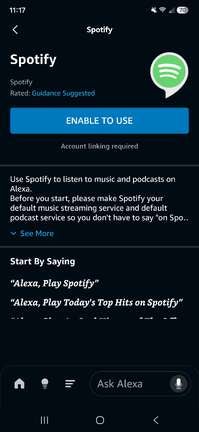
It’s quite easy to connect an existing Spotify account to your Amazon Alexa assistant for use with Amazon Echo speakers and other supported devices. First, ensure that you have the Alexa app downloaded on your mobile device.
Then follow these steps to set it up:
- Open the app.
- Click the More icon at the bottom of the screen.
- Select Settings.
- Scroll to Alexa preferences, then Music & Podcasts.
- Tap Link New Service, and choose Spotify.
- Follow on-screen prompts to link your account.
How to listen to Spotify on Fire TV
If you want to use your TV’s speakers or connected sound system to listen to your Spotify account, and you have a Fire TV device, linking Spotify is easy.
To get Spotify on your Fire TV device and command it with your Alexa voice remote:
- Open the Fire TV home screen.
- Head to the App Store and search for Spotify.
- Download the Spotify app.
- Log in using your credentials with the on-screen keyboard, or follow Fire TV’s instructions to link your account with your phone.
What commands can you give Alexa when using Spotify?
Once your Spotify account is linked to your Alexa device, you can use your Echo devices or Fire TV remote to enter voice commands to control music and podcast playback, and much more.
Use Alexa with Spotify to execute the following functions via voice command:
- Open Spotify.
- Pause, play, fast-forward, and rewind tracks.
- Change the volume.
- Play specific tracks, artists, playlists, or genres.
- Look up more information about tracks or artists.
- Choose and play a new podcast.
- Skip tracks.
- Start artist radio stations.
Can you play Spotify on multiple Alexa devices at once?
You can play the same track or podcast on multiple Alexa-equipped devices at once by creating a Multi-Room Music group of speakers you want to play Spotify on.
To set up a Multi-Room group to use with Spotify:
- Open the Alexa app on your mobile device.
- Select Devices, then the Add icon.
- Choose Combine Speakers, then Multi-Room Music.
- Select the devices you want to group for multi-room playback.
Once you’ve done that, you’ll be able to tell Alexa to play anything you want on Spotify, and it will begin playing that track on all devices in the group. Only one Spotify can be linked per Amazon account, so if there are two adults in your home who want to link Spotify Premium to distinct Alexa devices, you’ll have to set up an Amazon Household with distinct Amazon accounts for both users. Once you’ve done this, both can link their Spotify Premium accounts to Alexa devices. Amazon Household does not support more than two adult accounts at once.
Can you make Spotify your default music app on Alexa?
Yes, it’s a simple process to make Spotify your default music app on Alexa. Doing so will negate the need to specify that you want to use Spotify to play tracks; just say, “Alexa, play [track or artist name],” and it will automatically use Spotify to do so.
To make Spotify your default music app on Alexa:
- Open the Alexa app.
- Choose More, then Settings.
- Under Alexa Preferences, select Music & Podcasts.
- Tap Your Default Services.
- Select Spotify and click Done.
Do you need a Spotify subscription to listen on Alexa?
You do not need a Spotify Premium account to listen to the music streaming service with Alexa devices. Spotify has a strong free offering, and while you will have to create an account to use this tier, you will not need a credit card to listen to millions of songs and podcast episodes with your Alexa devices.