Roku vs. Fire TV: The best choice for movies, live TV, and more
Roku vs. Fire TV: The best choice for movies, live TV, and more
A deep-dive into features, pricing, apps, and performance to help you pick the right streaming platform.

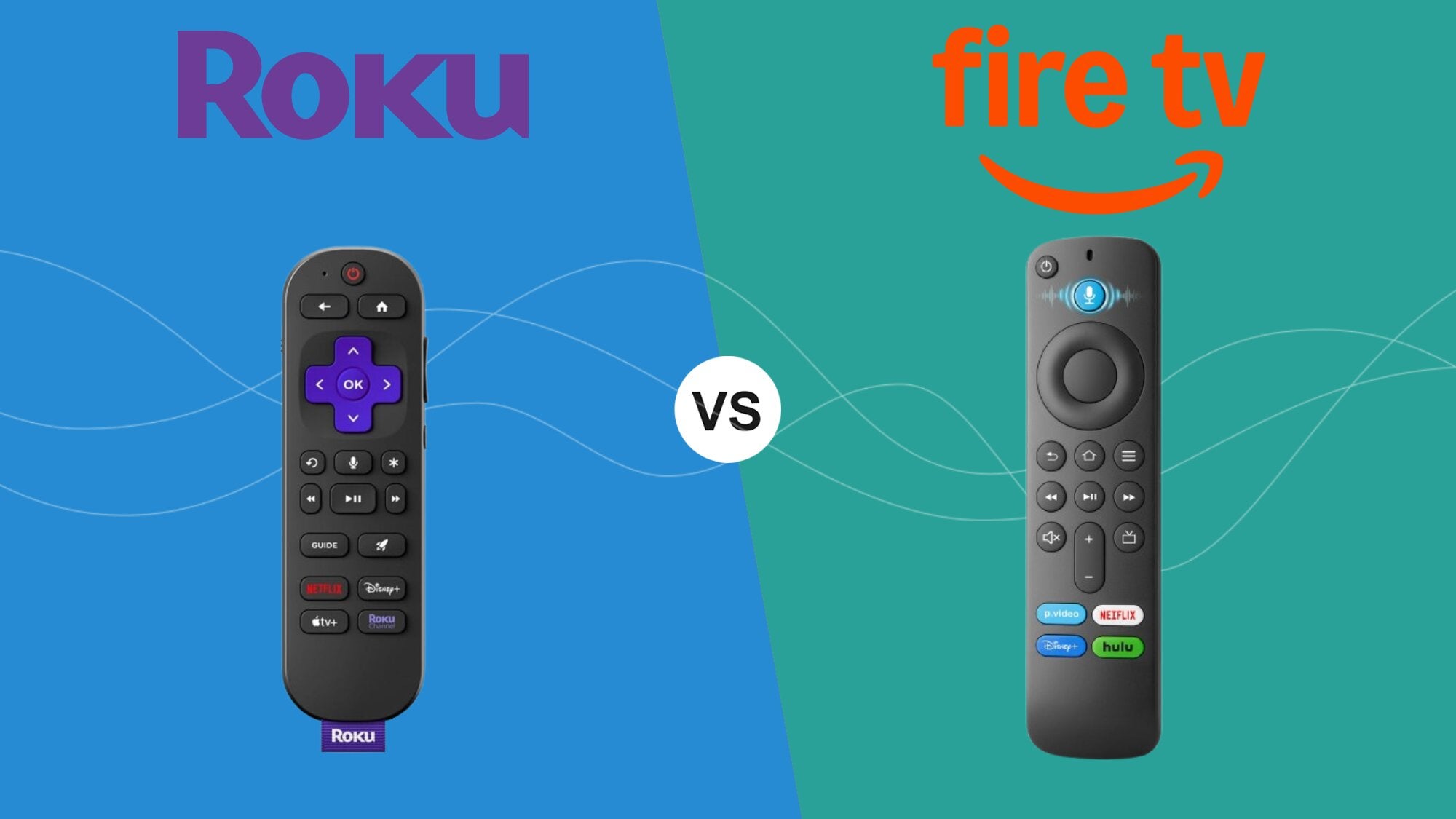
As more people switch away from traditional cable, the battle for streaming devices rages on. Where some used to buy an Amazon Fire TV Stick because it was cheap and easy, or pick up a Roku device because it was a neutral platform, it’s now harder to know which devices offer features that suit your streaming needs best and which are better left for someone else. Thankfully, I’ve been researching these devices side-by-side for years and know more than I’d care to admit about which features stand out.
If you’re cutting the cord for the first time or just exploring your options for a new streaming device, I’m ready to break down the pros and cons of Roku and Amazon Fire TV devices. Keep in mind that there are a few standouts in each lineup, but hopefully by the time you’re done reading this, you’ll have a much better idea of which device is best for what you need. Let’s get into it!


For many, Roku is the non-partisan device that anyone can love. You don’t have to be tied to any one ecosystem — like Google, Apple, or Amazon — to use it. There’s no subscription pricing or hidden associations; it’s just there, and it works.
Amazon Fire TV devices are obviously from Amazon, which may or may not make things easier, depending on how ingrained you are in the company. For many who already subscribe to Amazon Prime and read books on their Kindles, the Fire TV might be the simplest way to get started with streaming.
Regardless of where you stand, both platforms have advantages and disadvantages in terms of hardware, user interface, free and live TV offerings, and other features such as voice control.
2026 device lineups
Roku
- Roku Streaming Stick HD
- Roku Streaming Stick Plus
- Roku Streaming Stick 4K
- Roku Ultra
- Roku Streambar SE
| Stick | Stick Plus | Stick 4K | Ultra | Streambar | |
|---|---|---|---|---|---|
| Audio | Digital Stereo | Dolby Pass-through | Dolby Pass-through | Atmos Decode | Built-in |
| Video | 1080p HD | 4K HDR10 | 4K Dolby Vision | 4K Dolby Vision | 4K HDR10 |
| Remote | Voice Remote | Voice Remote | Voice Remote | Voice Remote Pro 2 | Voice Remote |
| Storage | 2GB | 4GB | 4GB | 4GB | 4GB |
| Connectivity | Wi-Fi | Wi-Fi | Wi-Fi | Wi-Fi & Ethernet | Wi-Fi & Bluetooth |
Amazon Fire TV
| Stick HD | Stick 4K Select | Stick4K Plus | Stick 4K Max | Cube | |
|---|---|---|---|---|---|
| Video | 1080p Full HD | 4K Ultra HD | 4K Ultra HD | 4K Ultra HD | 4K Ultra HD |
| Audio | Dolby-encoded | Dolby-encoded | Dolby Atmos | Dolby Atmos | Dolby Atmos |
| Remote | Alexa Voice | Alexa Voice | Alexa Voice | Alexa Voice Enchanced | Alexa Voice Enchanced |
| Storage | 8GB | 8GB | 8GB | 16GB | 16GB |
| Connectivity | Wi-Fi | Wi-Fi | Wi-Fi | Wi-Fi | Wi-Fi & Ethernet |
Comparing remotes
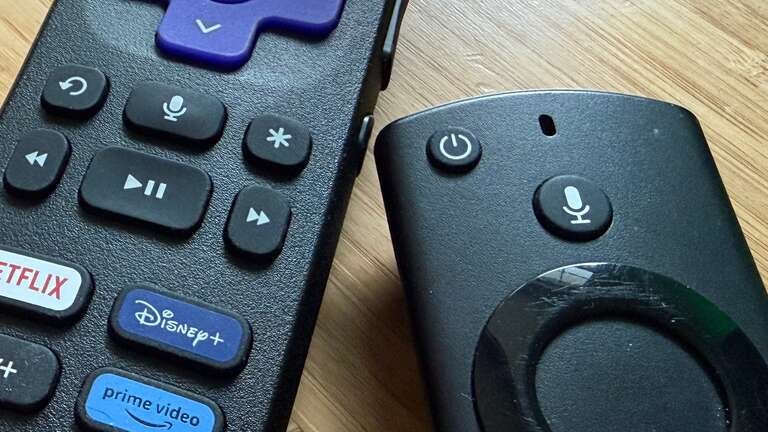
I remember getting my first Fire TV Stick and how much I loved the simple remote. It was such a far cry from my overcrowded cable TV remote, and I absolutely loved the minimalness of it; just the necessary buttons and no extra fluff. And while the remote hasn’t changed too much over the years, the addition of quick access buttons for services has added a bit of bloat, though the same can be said for Roku at this point as well.
The original Amazon Fire TV Stick remote — one of my first streaming remotes — was also one of my favorites. It had everything laid out where it needed to be, the directional buttons were responsive, and everything just worked. Not much has changed, save for the addition of quick-launch buttons for streaming services Netflix, Prime Video, and Hulu. The remote itself feels good and is streamlined, though it can be a bit slippery at times.
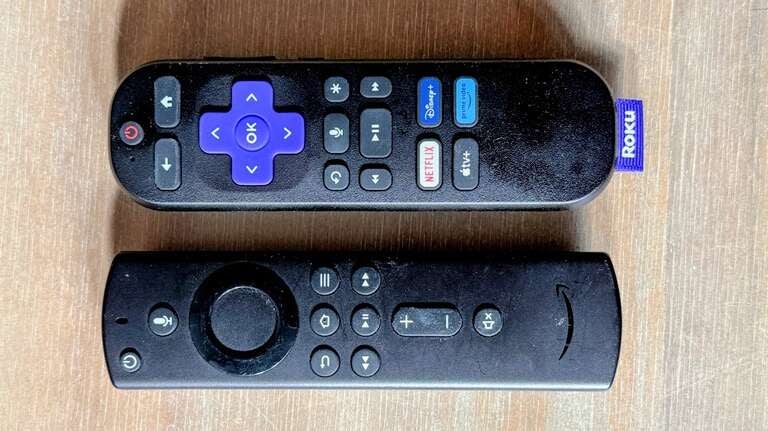
Roku remotes are very much the same, but slightly beefier in terms of size in most cases. The layouts between the companies’ remotes are extremely similar; Roku places the back and home buttons over the directionals, but the power button still remains at the top for both. Roku, like others, has also adopted the arbitrary quick-launch buttons. One of my biggest gripes was opening a new device, not only to find that the remote had these buttons to begin with, but that one or more were for streamers I didn’t even use. I had a Roku remote with a Vudu button kicking around for the longest time, but thankfully, I have landed on one with Apple TV, Netflix, Disney+, and Prime Video, all services I stream from regularly.
Is there a clear winner among remotes? Probably not. It’s really a matter of preference, and honestly, you’ll be able to adjust fairly quickly to whichever you end up with. There’s no crazy button reaching or oddly placed afterthoughts; they both just work.
I’d say the biggest difference between the two is the placement of the volume and mute buttons, with Roku opting for a side mount while the Fire TV remote places them with all of the other buttons.
UI and navigation
With each streaming platform comes a somewhat specific, yet generally relatively similar user interface. Again, for most people, the UI of a specific platform is something you can adjust to over time. Even if at first you think it’s overwhelming, after a few days in, you usually feel right at home. By no means should the UI be a high deciding factor when purchasing either of these devices, though it could be a tiebreaker if all of the more important aspects end up in a draw.
For Roku, the user interface remains very much a “set it and forget it” minimal design, prioritizing a linear, app-first philosophy that hasn’t fundamentally changed in years. When you power on a Roku device in 2026, you are greeted by the familiar, customizable grid of streaming channels that treats every service with equal visual weight. The navigation is strictly two-dimensional: a vertical menu on the left for system-level categories like “Search” or “Live TV,” and a horizontal grid on the right for your installed apps. This simplicity is Roku’s greatest asset, as it eliminates the multitude of choices often found on more complex platforms by prioritizing the content instead of the OS.
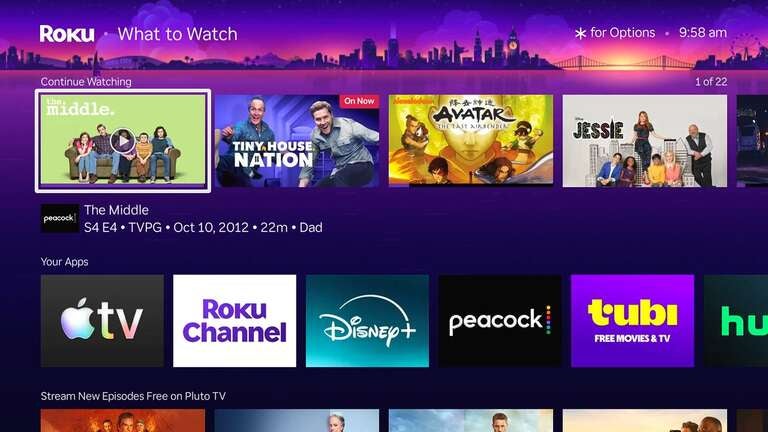
You can easily change the layout of the menu and apps, showing more of what you want and less of what you don’t. There are a few annoyances here and there, but no blocks of promos or platform-specific features staring you in the face.
However, this commitment to a legacy UI has drawbacks for users who want a more modern experience. While Roku has introduced newer menu rows to help with discovery, these features often feel tucked away rather than integrated into the core flow. The interface can also feel a bit static compared to the fluid, high-resolution animations of other platforms. Additionally, while the ad presence is limited to a single large marquee tile on the right side of the screen, the lack of deep integration means you’ll spend more time clicking into individual apps to see what’s new rather than seeing those recommendations directly on your home screen.
In contrast, Amazon’s Fire TV interface is a high-energy, content-forward ecosystem that functions more like a digital billboard than a simple app launcher. In 2026, Fire OS has doubled down on its AI-driven “Discovery Feed,” which uses your viewing habits across various services to populate the home screen with specific show and movie recommendations before you even open an app. The layout is heavily layered, featuring a massive hero banner at the top that often plays trailers automatically, followed by rows of “Continue Watching” content that aggregates your progress from Prime Video and third-party streamers. It is a dense, information-rich environment designed for users who want guidance and quickness.
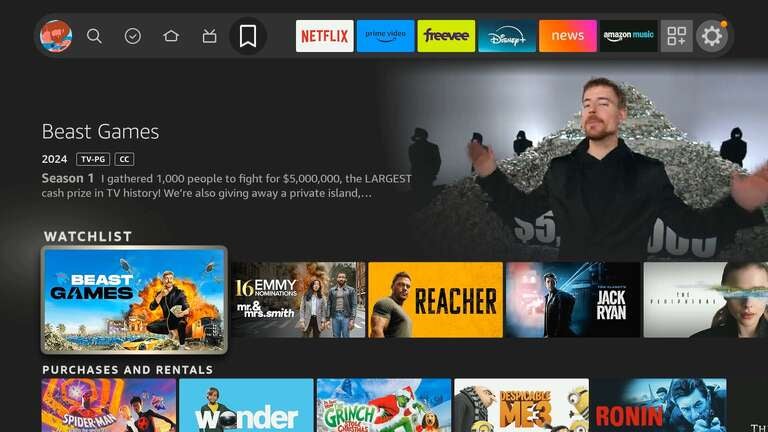
The trade-off for this sophisticated discovery engine is an interface that can feel cluttered and biased toward Amazon’s bottom line. Navigating Fire TV requires filtering through sponsored rows and aggressive promotions for Prime-exclusive content, which can make the experience feel busier and, on entry-level hardware, occasionally slower. While the ambient experience beautifully utilizes the screen for smart home widgets and fine art when the TV is idle, the actual navigation requires more clicks and scrolls to reach a specific, non-Amazon app than it does on Roku. It is a powerful, smart-home-integrated hub, but it requires the user to navigate through significant noise to reach their destination.
Voice
The voice assistant has evolved from a simple search tool into the primary way many users interact with their TV. While I personally don’t use voice all that often, there’s no denying it’s a major feature of all modern streaming devices. Amazon’s recently released Alexa+ represents the high-water mark for voice assistants, functioning as a true AI companion rather than a basic command listener.
Because it is built on a large language model, Alexa+ can handle complex, multi-step requests like “Show me movies suitable for an eight-year-old that don’t have talking animals” or “Find me that horror movie I was watching last week and skip ahead to the dinner scene.”
For smart home users, it also serves as the nerve center for the home, allowing you to view Ring camera feeds in a picture-in-picture window or dim the lights without having to pause your show.
The hardware side of Amazon’s voice experience is equally robust. Higher-end devices like the Fire TV Cube feature far-field microphones for total hands-free control — essentially turning your TV into a giant Echo Show. Even on the standard sticks, the Alexa button is the fastest way to navigate the dense UI. For users already deep in the Amazon ecosystem, the Ambient Experience allows you to use voice to pin widgets to the screen, such as sticky notes, calendars, or live weather updates, making the TV useful even when you aren’t actively watching a program.
Roku’s approach to voice is characteristically more grounded, focusing on utility and speed rather than conversational AI. The Roku Voice Remote Pro is the star here, offering a physical lost-remote finder that you can trigger by saying, “Hey Roku, where’s my remote?”
While it lacks the deep generative brain of Alexa+, Roku excels at direct execution. It is incredibly fast at launching apps, switching HDMI inputs, or finding specific titles. For many, Roku’s simplicity is its strength; it doesn’t try to be a digital assistant that knows your schedule — it just wants to help you find The Bear as quickly as possible.
Features
When it comes to features, the 2026 landscape has seen a surprising “merger of content” where the two rivals are actually sharing more than ever. However, the way they organize your live and free-viewing options still reflects their polar-opposite personalities.
Free TV
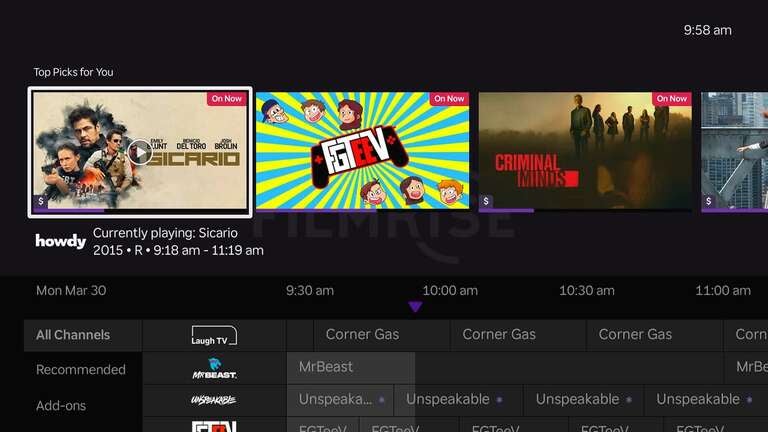
Roku remains the king of FAST (free ad-supported TV) via The Roku Channel. It’s not just an app anymore; it’s baked into the OS with a dedicated “Live TV” tile on the home screen that launches a cable-like guide. With over 400 free channels, ranging from local news to around-the-clock “Doctor Who” loops, Roku’s strength lies in its simplicity.
Roku has also recently leaned into its Sports Zones, which aggregate live games from all your different apps (like Peacock, Paramount+, and ESPN) into one master schedule so you don’t have to hunt for the actual channel the game is on.
Amazon has countered this with its massive free tab and the Fire TV Live Guide. Historically, Amazon focused on its own (now-defunct) Freevee service, but it’s since opened the gates to others. Through a landmark partnership, you can now actually pull The Roku Channel’s live feeds directly into the Fire TV Live Guide, alongside Pluto TV and Tubi.
Amazon’s feature set is more aggressive; it uses channel-surfing logic, so you can say, “Switch to the NFL channel,” and it will jump straight to the live feed, regardless of which app is hosting it.
App ecosystems
Both platforms boast a library of over 10,000 apps, so you won’t miss out on the majors like Netflix, Disney+, or HBO Max on either. However, Roku is the “neutral” choice — it doesn’t have a horse in the race, so it plays equally well with Apple AirPlay 2, Google Home, and Amazon Alexa. If you’re a multi-platform household, Roku is the easier bridge device. It also features Private Listening, a killer feature that lets you stream audio through your phone’s headphones via the Roku app, which is often more stable than standard Bluetooth pairing on a TV.
Fire TV is less of a neutral bridge and more of an Amazon command center. Its “Ambient Experience” is a standout feature, turning your TV into a smart display that shows your Ring doorbell feed, your grocery list, and your Amazon Photos when you aren’t watching a show. While Roku is better for users who just want to watch TV, Fire TV is superior for power users who want their TV to be an active part of their smart home and are already invested in Amazon’s ecosystem.
One final note: Amazon has recently tightened restrictions on sideloading third-party apps, so if you were planning to use a Fire TV Stick for unofficial app tweaks, those freedom features are significantly more limited than they were a few years ago.
Gaming
While gaming isn’t necessarily a primary feature of streaming devices, the divide between these two platforms has widened, with Amazon positioning itself as a legitimate console alternative (sort of) while Roku sticks to doing what it does best. Amazon’s Fire TV ecosystem is built around Amazon Luna, a cloud gaming service that is now deeply integrated into the home screen on most Fire TV devices. For Prime members, this means instant access to a rotating library of titles — ranging from casual family games to big hits like “Dead Island 2” and the Sonic series — without needing a physical console.
Roku, by contrast, has largely abandoned the native app gaming market in favor of becoming the ultimate low-friction monitor for your PlayStation 5 or Xbox Series X. While you won’t find a cloud service like Luna on Roku, the Roku Pro Series TVs are engineered for invisible performance. They feature a solid 120Hz refresh rate and even an auto game mode that boasts some of the lowest input lag in the industry. You won’t find an extensive library of on-device games with Roku, but some of their latest TV models will certainly do their best to keep up as displays for next-gen PCs and consoles.
Which should you choose?
So the big question is still, which one should you choose? I hate comparisons like this that leave the choice up to you — “They’re both great!” or “Either will do just fine.”
While I love the functionality and some features of the affordable (and often on sale) Amazon Fire TV devices, I’m all-in on Roku. Amazon’s platform was my streaming choice for years, but as it became more bloated and Amazon started pushing more and more services in my face, I switched to #TeamPurple and never looked back. Roku devices are speedy, inexpensive, and simply do what I want. Even though there are some ads and a bit of intrusive banners from time to time, I’m not tied to any platform that locks me in or tries to get me to do anything other than stream. Roku has all the major apps I need, none of the bloat I don’t want, and it just keeps working well for me.
Will that change over time? Possibly. There’s always new hardware coming out, and some devices do get worse over time, but for now, I’d say Roku as a whole is the better platform than Fire TV. With only a few options in the lineup, all inexpensive, you really can’t go wrong with one or more powering your streaming setup.