YouTube TV didn’t improve its multiview with entertainment channels
YouTube TV didn’t improve its multiview with entertainment channels
I will likely stick with YouTube TV as my live TV streamer of choice until someone else finds a better way to make multiview worthwhile year-round.


Imagine, if you will, a world in which everyone in your family is able to watch what they want at the same time… on the same screen. One person can follow the NBA playoff game, someone else can keep an eye that night’s MLB game, another family member can follow along with the latest episode of “Property Brothers,” and one more person can watch what’s happening on “Law & Order: SVU.” Unfortunately, despite the expansion of multiview features across streaming services — especially YouTube TV in recent years — that whole-house satisfying functionality is still far from reality.
Now don’t get me wrong, YouTube TV is a fine live TV streaming service, and I don’t mean that in a pejorative sense. It is a fine service, as in, it is a solid, functional, utilitarian platform. It is not an inexpensive cord-cutting option, but not any more so than its most comparable competitors. It is not without its problems, of course; its menus are wonky, its live channel guide is anything but intuitive, and its DVR is an unmitigated mess. It doesn’t offer the smaller, genre-specific packs that DIRECTV does, it doesn’t come with any benefits akin to Hulu + Live TV’s Disney Bundle (would it kill you to include YouTube Premium as a nice little bonus, Google?), it isn’t nearly as cheap as Sling TV. However, it does have one significant leg up on all other streamers that keeps me subscribed: multiview.
As someone who watches the previous day’s episode of “General Hospital” while I work every day, never misses a Marvel or Star Wars show, and has an affinity for under-the-radar sports, from a value perspective, I was always partial to Hulu + Live TV because it came with on-demand Hulu and all of Disney+ and ESPN+ for free. But as someone who lives and breathes college football all year round, especially in the fall, once YouTube TV rolled out the multiview functionality, it became the only legitimate option to watch as many games as I want during the season.
Yes, this is my real college football-season TV set up:
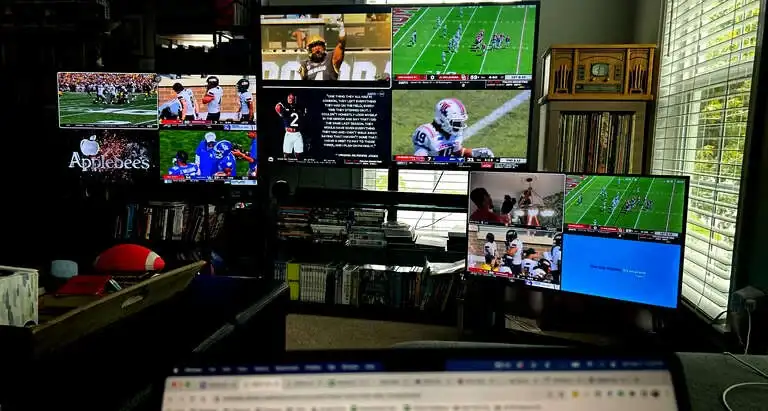
While other streaming services have multiview options (Fubo makes it available to Apple TV and Roku users, and Peacock offers it during large-scale sporting events like the Olympics and the U.S. Open golf tournament), no streamer has the robust multiview offerings that YouTube TV does. While there are still technical limitations that prevent YouTube TV from delivering a fully customizable experience, I was optimistic that a multiview that worked outside the narrow limitations of sports was achievable when the service announced in April that it would be bringing some entertainment channels into the multiview fold.
The platform had long had a scant selection of non-sports multiview options: a four-cable news channel option (featuring BBC World News, CNN, Fox News, and MSNBC), a two-weather channel option (Fox Weather and The Weather Channel), a two-cable business news option (CNBC and Fox Business Network), and a local networks option, showing up to four local affiliates in your market.
I have found those options to be sturdy, reliable viewing options to have on — preferably muted — while I work during the day. But the prospect of being able to have a multiview option that allows me to watch a game and a show at the same time was attractive. So, I have been sampling the new multiview options replete with entertainment channels to get the full scope of what the new addition has to offer.
Over the course of a few days in recent weeks, I was able to check out a variety of sports and entertainment channels during the day and in primetime. I was able to tune into and “build” multiviews featuring Bravo, CNBC, CNN, ESPN, ESPN2, Food Network, Fox News, FS1, Golf Channel, Hallmark Channel, HGTV, MS NOW, TBS, TNT, and USA Network, which are all owned by Comcast, Disney, Fox, Hallmark, and Warner Bros. Discovery.
Since YouTube TV first launched its multiview ahead of the 2023 NCAA Men’s Basketball Tournament, we have discussed the technical limitations that make it next to impossible to allow streaming customers a fully customizable multiview experience without the added computing power of a more advanced streaming device than what is found in a smart TV or simple dongle.
However, short of that eventuality, what YouTube TV is currently offering is pretty good. By prepackaging all of the multiview options available — considering channel availabilities — the platform allows viewers to arrange the number of feeds they want to watch, along with which channels they want included. While you can’t reorganize the viewing boxes to fit how you want to see them, you can build your multiview to include what you want to see.
Explore YouTube TV’s afternoon multiview setup


I found that the available collection of channels seemingly works best as afternoon, background viewing. As I was perusing the options, I almost always had the Women’s College World Series and a handful of golf events happening, so I was able to get some live sports during the day, but that won’t be the case all the time. Otherwise, the sports channels just offer a mind-numbing rotation of the same rehashed hot takes over and over again. Fortunately, multiview allows you to watch two, three, or four different channels at a time, so you can customize what you want (and don’t want) to watch, from the approved list of channels, of course.
Unfortunately, YouTube TV’s entertainment-enhanced multiview really falls off in primetime. While I am admittedly a devoted Hallmark Channel and HGTV watcher (Hallmark even made it into my bio at the bottom of this page), those are not the types of programs that make this type of feature attractive for most users. In my mind, the biggest benefit of something like this would be to allow viewers to keep an eye on a game or two while watching their favorite sitcom or procedural at the same time. But when the only entertainment options are lean-back cable fare that will be rerun dozens of times over the next week, it makes the draw much less enticing. Without the urgency and freshness of can’t-miss TV in the mix, the value proposition of a mixed sports and entertainment multiview is severely undermined.
Explore YouTube TV’s primetime multiview setup


I understand that there are far more contractual hurdles to overcome when including national networks and their local affiliates, but for YouTube TV to truly make this product something that appeals to families, they need to find a way to broaden the scope of channels outside of the handful of cable offerings owned by just those five companies… especially when they aren’t even the complete cable offerings of those five companies.
Nonetheless, if you are someone who loves binge-watching reality shows, home reno programs, or feel-good rom-coms — while also keeping an eye on the game — YouTube TV does provide some good options.
Ultimately, I am extremely pro-multiview, and the service that has the best functionality in that department will likely be the one that gets my live TV streaming dollars, especially once college football season kicks off every fall. Right now, YouTube TV is the only real player in that game. While Fubo does have a more customizable multiview on Apple TV and Roku devices (both of which I have), its lack of Warner Bros. Discovery channels is a no-go for me, especially since TNT will be a major part of the College Football Playoff for the foreseeable future.
So, for now, YouTube TV is the only way to go, but its multiview functionality outside of busy sports windows continues to leave a lot to be desired. The baby steps of introducing entertainment and news-focused cable channels into the mix are positive ones, but for multiview to truly be a product that keeps customers excited about and engaged with YouTube TV outside of the football season and March Madness, there needs to be substantive technological and contractual changes made behind the scenes.

YouTube TV
YouTube TV is a live TV streaming service with more than 60 channels for $82.99/month. This plan includes local channels 32 of the top 35 cable channels, and regional sports networks (RSNs) in select markets. The base plan includes more than 100 live channels, including major broadcast networks like ABC, CBS, FOX, and NBC, as well as popular cable channels such as ESPN, CNN, FX, USA Network, and TNT. Local channels are included in most markets, making YouTube TV a full replacement for traditional cable for many viewers.