Gemini Air vs. the competition: Roku, Fire TV, Apple TV, and more
Gemini Air vs. the competition: Roku, Fire TV, Apple TV, and more
Is DIRECTV’s hardware worth it or is it just more of the same?


The Gemini Air from DIRECTV is a streaming dongle that brings all your DIRECTV services — and more — to your home’s streaming setup. While it may seem like just another streaming device (which it kind of is), it also has some features that make it stand out from the likes of Roku, Apple TV, and Fire TV, while other features hold it back. If you’re a DIRECTV subscriber and considering the Gemini Air as your next streaming device, stick with me as I run through the pros and cons, as well as how it stacks up against other popular streaming devices.

Everything you need to know about the Gemini Air
What is the Gemini Air
The Gemini Air is a streaming dongle from DIRECTV. It does much of what your current streaming device probably already does, but it’s meant for customers who are all-in with DIRECTV. The Android-powered device doesn’t rely on the Roku, Amazon, or Fire TV ecosystems; instead, it engulfs you in all things DIRECTV — from live channels to on-demand content to DVR. As with all streaming hardware like this, the Gemini Air comes with a remote (it’s one of my favorite features), but it’s much beefier than your standard streaming remote. Here you’ll get a more cable-like experience, complete with guide buttons, navigation, volume and channel controls, and much more.
Hardware
From a hardware standpoint, the Gemini Air most reminds me of the original Chromecast with Google TV. It’s a bit larger than the current Fire TV models and significantly so compared to the newest Roku streaming sticks, but still small enough to tuck away behind your TV and not think about it. The Gemini Air did take quite a while to fire up the first time I used it, and it does seem to have a consistently longer start time than my Roku. However, I think for most people, it will be left on all the time anyway, so restarts will be few and far between. Overall, the Gemini Air is speedy and mostly lag-free. The internal hardware is more than sufficient to power through browsing the UI, swapping channels, and everything else you’ll need to do.
One significant advantage of the Gemini Air over other devices is its remote. As I said in my review, I absolutely love the remote. It’s more traditional in design than a streaming device remote, featuring buttons for various functions, including channels, volume, guide, and voice control. If you ever feel like your bare-bones Fire TV or Apple TV remotes aren’t cutting it, the Gemini Air remote is here to save the day.

Software and UI
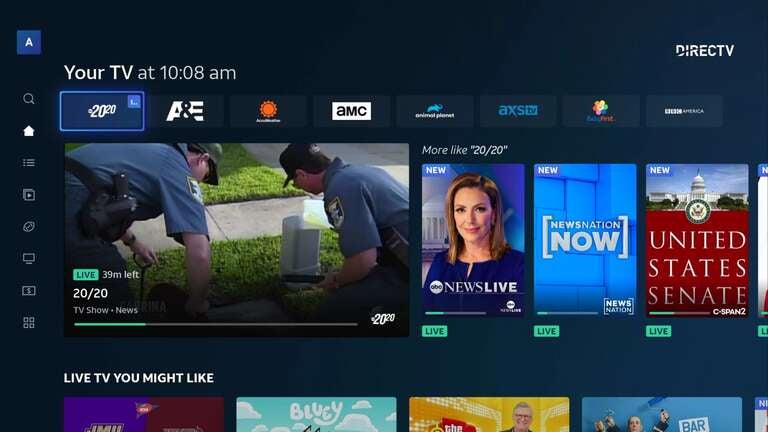
The Gemini Air takes DIRECTV’s traditional set-top box experience and translates it into a modern streaming environment. The interface feels structured and familiar for anyone coming from cable — the live guide is always front and center, DVR and on-demand are just a click away, and the navigation remains tightly focused on linear TV first. The Gemini Air feels like a seamless cable upgrade rather than a totally new paradigm. You get features like multiview, live channels, and browsing through a full grid guide without ever feeling like you’ve left cable. If your household still watches a lot of cable-style content, Gemini Air’s UI genuinely fits that viewing pattern.
That said, it’s very different from how the major standalone streaming platforms present things. Roku emphasizes simplicity above all else — no deep menus, no heavy recommendations, no crazy algorithmic rows — just clean tiles and speedy navigation. Fire TV leans the opposite direction, going all-in on Amazon-driven personalization and integrations. The home screen is visually dense (it’s one of my least favorites), packed with content rows, and regularly surfaces promotions or Amazon Originals. Apple TV sits somewhere entirely different, offering the cleanest, most premium-feeling interface with smooth animations, zero ads, and a navigation model built around polished apps rather than channels.
Compared to all three, Gemini Air’s UI is less generalized and more purpose-built. It works brilliantly for DIRECTV customers, but people who prefer a minimalist app launcher or want a more universal browsing experience may find Roku and Apple TV more in line with their expectations.
Apps and services
While Gemini Air is designed to keep DIRECTV at the core of the experience, it still supports a wide range of third-party apps. Netflix, Disney+, ESPN, Prime Video, HBO Max, and hundreds of others are available and perform well within the interface. DIRECTV does an impressive job of integrating these apps into the broader experience, surfacing content within the guide and combining streaming titles with live programming in a way that feels cohesive rather than bolted on. If you’re flipping through channels, you might see a recommended movie from a streaming app right alongside DIRECTV’s lineup. This hybrid approach makes switching between streaming and live TV frictionless.
Each competing device takes a different approach to app ecosystems. Roku still has the broadest selection overall and the most straightforward app store — everything is easy to find, and performance is generally snappy even on budget hardware. Fire TV supports nearly all major apps as well, but obviously heavily pushes Amazon-owned services and often routes searches through Prime Video content first. Apple TV supports fewer niche apps than Android TV or Roku. Still, the apps it does support are usually of the highest quality — smoother, more responsive, and updated more consistently, thanks to Apple’s hardware advantage. In terms of pure app flexibility, Gemini Air lands closer to Fire TV, but its DIRECTV-centric integration gives it a unique flavor that none of the others attempt to replicate.
Features
The Gemini Air’s feature set revolves tightly around DIRECTV, making it much more than a typical streaming stick. Its biggest strengths are live TV integration, DVR access, on-demand content, and DIRECTV exclusives, like multiview. These features make the Gemini Air behave like a premium cable box with modern streaming layers stacked on top. Switching between live channels and apps is seamless, and the system automatically recommends DIRECTV content tailored to your viewing habits. For households that still prefer traditional channel-surfing but want access to streaming apps without juggling inputs, it’s one of the most unified experiences available.
Compared to Roku, Fire TV, and Apple TV, these platforms focus on delivering a broad, neutral streaming experience rather than building around any one service. Roku’s entire feature philosophy is built on stability, simplicity, and universal compatibility — it doesn’t push any single service and doesn’t try to behave like a cable box. Fire TV takes a more integrated approach, but all roads lead back to Amazon’s ecosystem, whether that’s Prime Video, Alexa features, or Amazon Channels. Apple TV emphasizes premium features, including AirPlay, HomeKit, Apple Arcade, Dolby Vision, and high-end HDR capabilities. None of them replicates Gemini Air’s “streaming dongle that feels like a cable box” identity, which can be either a major advantage or a limitation depending on how much DIRECTV dominates your viewing.
Voice and search
Gemini Air utilizes Google Assistant for voice commands, providing a solid foundation for media search, app launching, and general queries. It recognizes spoken content titles accurately and can retrieve results across DIRECTV and installed apps. You can also use it to control smart home devices in the Google ecosystem, though its capabilities aren’t as deep as a standalone Google Nest device. The voice button on the remote is large and easy to access, making voice commands feel more like part of the TV experience rather than a secondary feature.
Each competing platform handles voice differently. Fire TV delivers the most robust voice experience thanks to Alexa — you can control nearly every aspect of the device, interact with smart home routines, and even make announcements or control Amazon orders. Roku keeps things straightforward and intentionally narrow, supporting basic show and channel searches while avoiding more advanced smart assistant features. Apple TV arguably offers the most accurate media-aware search through Siri, particularly when retrieving titles from major apps or controlling playback with precision. Compared to all three, Gemini Air lands in the middle: more capable than Roku, but not as full-featured as Fire TV or Apple TV, it is perfectly tuned for DIRECTV subscribers who want quick access to channels and DVR.
Pricing
Gemini Air’s pricing is structured differently from standalone streaming devices, as it’s tied directly to DIRECTV service plans. In many cases, new DIRECTV subscribers receive the Gemini Air at a discounted rate or as part of their setup, turning it into an extension of the subscription rather than a standalone purchase — typically $10 per month. Because of this model, it’s hard to compare the Gemini Air to Roku, Fire TV, or Apple TV strictly by retail price. For DIRECTV customers, especially those deeply invested in live TV and DVR, the Gemini Air offers exceptional value, as it unlocks the full DIRECTV experience with no additional hardware required. For those who may not be too engulfed in DIRECTV, it’s probably not the best option.
When compared directly to Roku, Fire TV, and Apple TV on cost alone, the differences become clearer. Roku and Fire TV offer entry-level devices for under $30 and rarely exceed $60 unless you’re buying a premium box. Apple TV sits at the high end with models in the $129 to $149 range, but you’re paying for unmatched performance and build quality.
Gemini Air, by contrast, isn’t something you’d buy outside the DIRECTV ecosystem — its value disappears quickly without DIRECTV service. At a lease price of $10 per month, this makes it simultaneously a fantastic deal for DIRECTV customers and a non-starter for anyone considering a general-purpose streaming device. Its worth is entirely tied to how committed you are to DIRECTV as your primary TV source.

Is the Gemini Air right for you?
The Gemini Air makes the most sense for DIRECTV customers who want a modern streaming device that still feels like a cable box. Its remote, guide, DVR access, and channel-centric UI all cater to people who prefer flipping channels over browsing streaming rows. If DIRECTV is your primary TV source and you want a single device that combines live TV, on-demand content, and apps in one cohesive interface, the Gemini Air is the best possible choice. It effectively replaces the need for multiple inputs or juggling multiple remotes.
For everyone else, the standard streaming devices each offer their own clear advantages. Roku is ideal for households that want the simplest, most stable, most neutral platform — something that “just works” without pushing ads or ecosystems too aggressively. Fire TV is ideal for users who are deeply immersed in Amazon’s ecosystem, particularly those who utilize Alexa or subscribe to multiple Amazon Channels. Apple TV is the flagship option for users who want top-tier responsiveness, the best app quality, high-end picture formats, and seamless integration with other Apple products. In that landscape, Gemini Air isn’t a competitor so much as a specialized tool — unbeatable for customers who live for DIRECTV content, but not so much for everyone else.