Prime Video Tweaks User Interface to Make it Easier to See What Titles Are Free and What You Have to Pay Extra For
Prime Video Tweaks User Interface to Make it Easier to See What Titles Are Free and What You Have to Pay Extra For
A new navigation bar will house a tab filled only with shows and movies that are available with your Prime Video subscription.


The Prime Video user experience has always provided one challenging aspect that many other streaming services don’t force customers to deal with. As a subscription video streamer, Prime Video offers a wide range of titles that viewers are allowed to watch at no extra cost outside their monthly subscription fee. But Prime Video also carries a wide selection of shows and movies that can only be watched if a viewer rents or purchases them for an extra fee, and it can sometimes be hard to tell which is which. This week, Amazon has begun rolling out a new user interface for Prime Video to help solve that problem, an update that will also leverage artificial intelligence to help viewers find something new to watch.
Key Details:
- The new Prime Video user interface introduces a “Prime” tab that houses titles available to stream with a subscription.
- Customers who buy add-ons like Max or Paramount+ can also find their content more easily in the content row at the top of the screen.
- Using Generative AI, Amazon will show viewers new “Made for You” collections comprised of titles available with a subscription and available to buy or rent.
The new changes to Prime Video’s UI should make it much easier for viewers to know which shows and movies they can watch with their subscription, and which ones they have to pay extra for. That starts with a navigation bar at the top of the screen, which will likely look pretty familiar to Prime Video subscribers. Options like “TV Shows” and “Movies” are still there, but the bar will welcome a new “Prime” tab that exclusively carries titles that are included with a Prime Video account at no extra cost.
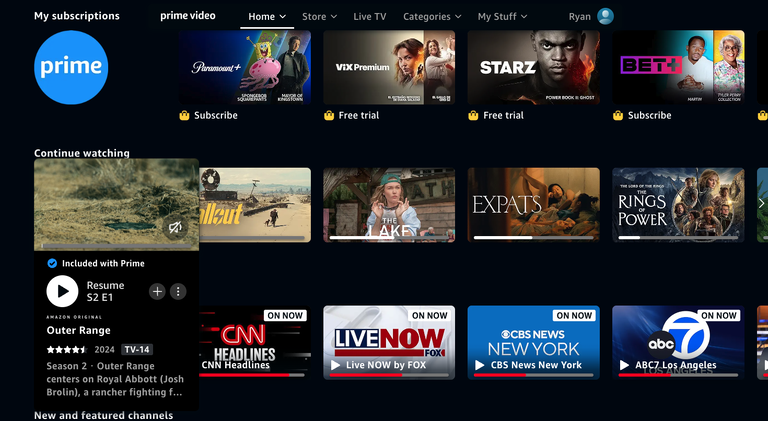
The new “Prime” tab houses both on-demand and live content that viewers can access with their subscription.
The tab has on-demand streaming content, including Prime Video originals like “Fallout,” “The Boys” and the upcoming second season of “The Lord of the Rings: The Rings of Power.” It will also house live content from free streaming channels available to watch with Prime Video, including news options that may be available in your area.
The new Prime Video navigation bar will also allow customers to see any extra subscriptions they’ve added to their account at the top of the screen. The Prime Video Channels digital store allows subscribers to purchase additional streaming services like AMC+, Max, Paramount+, STARZ and others, and viewers will be able to browse those options directly from shortcuts in the nav bar on Prime Video’s upgraded UI.
“We’re always listening to customers and reviewing feedback, and it’s clear that many are in search of a more intuitive streaming experience,” said Kam Keshmiri, VP of Design at Prime Video. “With the improvements we have made to the user experience, customers will be presented with an easy-to-navigate entertainment destination where they can discover new titles and enjoy favorites, as well as sign up or switch add-on subscriptions with just a few clicks. Best of all, they can do this while using a single login.”
In addition to the new navigation bar, Prime Video is infusing its content recommendation engine with Generative AI to better show people titles they may never have considered, but would love. This will include the creation of “Made for You” collections in the “Movies” and “TV Shows” tabs, that will offer viewers recommendations pulled from the Prime Video library as well as other sources, including other streaming services that can be added onto a Prime Video account.
In my view, these are useful upgrades that will make a meaningful difference for Prime Video subscribers who have a hard time distinguishing which titles they have to buy or rent, and which ones are already included in their subscription. I also love the ease with which viewers can now head to their add-on subscriptions to see what’s available with those, as previously it could be tricky to find that content.
Keep an eye open for the new Prime Video UI on your device. It begins rolling out on Tuesday and will continue making its way to additional devices and customers in the coming weeks.

Prime Video
Prime Video is a subscription video streaming service that includes on-demand access to 10,000+ movies, TV shows, and Prime Originals like “The Lord of the Rings: The Rings of Power,” “Jack Ryan,” “The Marvelous Mrs. Maisel,” “The Boys,” and more. Subscribers can also add third-party services like Max, Showtime, STARZ, and dozens more with Prime Video Channels. Prime Video also offers exclusive live access to NFL Thursday Night Football.